Zazzle Shop

Screen printing
Showing posts with label iphone app. Show all posts

Tuesday, October 25, 2011

The 35 Best Free Apple iPhone Apps

If 'free' is the magic word when you're shopping for iPhone apps, this essential set of 35 should be on your list.


Apple iPhone 4S


I've paid for precisely two Apple iPhone apps out of my own pocket… and one was a fat-finger mistake (my pudgy paws slipped on the "buy" button, and I entered my password without realizing what I was doing). "Free" is the magic word for me. When I hear about a fantastic app for the iPhone, I always check to see if I can find a free alternative that's just as good. Every so often, I'll even find a free one that beats the tar out of the paid app.

Apps are what transform the iPhone from mobile phone to pocket PC. Without them, you might as well be carrying around that old flip phone you had in 2004 that could play an 8-bit knock off version of Tetris. Okay, it would still be better in many ways, but you get the point. We at PCMag spend thousands of hours each year scouring iTunes, speaking with developers, reviewing the best apps we find, and hunting for hidden gems. If there's an app that makes owning the iPhone more worthwhile, we find out about it. And if they're free—hey, even better.

The 35 apps that made the cut for this list are the ones that have shown outstanding performance, have been well received by a variety of technology users, and are free. And "free" means free. No gimmicks, no "membership required." Free. Period.

Missing from this list are apps and features (like Siri) that come pre-installed on the iPhone, although they are certainly not to be overlooked. The YouTube, Maps, and Clocks apps in particular should not be ignored, while the iTunes, Music (formerly called iPod app), and App Store apps typically see a fair share of well-deserved usage, but I suppose you technically paid for them because you bought the phone, so they're not really free. In any case, you don't need to choose to download them, so we're not listing them here.

If you have more recommendations for more free apps that we at PCMag need to check out, post your suggestions in the comments.—Next: Apps 1-10 >


Monday, October 10, 2011

Say cheese! iPhone app catches thief

Picture of suspected phone thief Brian Chattoo snapped by the robbery victim's

Picture of suspected phone thief Brian Chattoo snapped by the robbery victim's "iGotYa" iPhone app. (NYPD/WCBS)

(CBS News)

NEW YORK - Police in Queens said they've arrested a robbery suspect whose picture was snapped by the iPhone's iGotYa app.

CBS Station WCBS reports Brian Chattoo, 23, was captured Friday at his home in Richmond Hill.

Police said he snatched a woman's iPhone from her pocket on Monday on Liberty Avenue.

When he tried to unlock the phone, the iGotYa app took his picture - and emailed it to the victim.

Chattoo is charged with grand larceny and criminal possession of stolen property.

Before the theft earlier this week the phone's owner, a 31-year-old woman, downloaded a mobile phone application that will snap a picture of whomever tries to unlock the phone using an incorrect password, and then e-mail that photo and the phone's location to her.

Police say the app, iGotYa (available online but not for sale via iTunes) worked.

When the victim received the photo of a young man with short hair and an earring unknowingly staring into the camera, she passed it along to law enforcement officials.

A police spokesman told The New York Times that plain clothes officers recognized the young man in the picture, identified as Brian Chattoo.

Wednesday, July 20, 2011

Star Wars Blu-Ray extras revealed through iOS app

By Electronista Staff
From http://www.electronista.com/

App debut in time for San Diego Comicon


Two months ahead of the formal release of the six-part Star Wars saga on Blu-Ray, a "sneak peek" app has previews of some of the 40-plus hours of bonus features and footage, and will be available for download from the iTunes App Store on Wednesday, July 20th, Engadget reports. The bonus material will include never-before-seen content from the Lucasfilm archives, and new interviews with the cast and crew.
The release of the free companion app -- titled "Star Wars Blu-Ray: Early Access" -- so far ahead of the actual release is unusual, but was timed to be available during the San Diego Comic-Con, one of the largest "cult media" and entertainment events in the U.S., regularly drawing tens of thousands of fans and selling out months in advance. Lucasfilm representatives and the app developers will be at booth #3528 with demonstrations of the app and further looks at the extra material on the Blu-Ray edition, including an "in-universe vantage point" of one of the saga's most iconic moments.

The box set, containing all six films, is expected to retail for $140. Two "Trilogy" Blu-Ray packages will also be made available for $70 each, as well as the individual films. This marks the first time the films have been officially made available in high-definition, and the first time the entire set of six films has been offered in a single package. Pre-ordering is available now through Amazon. [via Engadget]


Tuesday, May 10, 2011

Free iPhone App Identifies Tree Leaves

By Wired UK

By Mark Brown, Wired UK

A new iPhone app called LeafSnap is a field guide for tech-friendly naturalists. It can identify a tree’s species by analyzing a photograph of its leaf.

Point your smartphone’s camera at one of nature’s solar cells (laid out flat on a white piece of paper) and the app will go to work. It separates the leaf from the background, and then analyzes the leaf’s shape.

The algorithm, designed by facial recognition experts at Columbia University and the University of Maryland, gets measurements from numerous points along the leaf’s outline. These are then compared to an encyclopedic database of leaves — kindly donated by the Smithsonian Institution and non-profit nature-photography group Finding Species — to give you a result.

If it isn’t completely sure, it will show you an entire collection of possible leafy matches. You can then look at more information on those trees — finding out where they grow, what time of the year their flowers bloom and pictures of their fruits, seeds and bark — to make a proper decision on what type of leaf you’ve got in front of you.

The app also has a dabble in citizen science. Once you’ve correctly labeled your leaf you can tap “label,” which uploads your data to a community of scientists. Your data will be geo-tagged to your current location, letting flora experts map and monitor the ebb and flow of different trees.

Unfortunately for nature geeks (or shape recognition nerds) in the U.K., you’ll probably have trouble getting the app to identify Britain’s native leaves. LeafSnap currently includes the trees of just New York City and Washington D.C. A full rollout covering the United States is planned, but there are no promises for overseas trees.

Android and iPad versions of the app are planned for this summer. In the meantime, download the free iPhone app.

Image: Dave Mosher/Wired.com

Source: Wired.co.uk

Friday, April 15, 2011

The coolest technology you've never seen

A new visual recognition technology by Autonomy maps video and other content into real-life smartphone video images in real time

By Eric Knorr | InfoWorld
Here's one you have to see to believe. Autonomy, the largest British software company -- best known for its enterprise search and compliance technology -- has applied its intellectual horsepower in meaning-based computing to visual recognition for smartphones. Soon you'll be able to download its Aurasma iPhone/iPad app, which enables you to point your camera at static real-world objects that, once recognized, magically come to life on the smartphone screen, similar to the way pictures in the Daily Prophet newspaper animated themselves in Harry Potter.

Check the video demo. The amazing thing is that the video mapped into the real-world scene stays within the bounds of the recognized object, even as you pan the camera around. One example shows a movie poster coming to life; another demonstrates a video inserted into a static newspaper photo; the last is a cereal box with a TV commercial mapped in. The advertising and publishing opportunities are pretty obvious, but the company says anyone will be able to tag reality with messages or images or even interactive games of their own that pop up. Just capture the real-world image, load it into the database, and attach what you want to overlay.


According to Autonomy, the app will be able to recognize up to half a million images. Autonomy's business customers are expected to establish channels loaded with recognition files for the real world. The app will be available at no charge, and even on the back end, in a rough approximation of the Web commercial publishing model, Autonomy will charge businesses only when advertisements are delivered.

The technology has its limitations. As Autonomy CEO Mike Lynch says, the iPhone 4 has "barely enough processing power" to run the Aurasma app. Recognition takes a second or so, so forget about images that, say, flit by as you pass them in a car. Nor can faces be recognized, because that would require the construction of a 3D model currently beyond the technology's capabilities. Aurasma can only recognize images or scenes -- such as a building facade -- that are roughly 2D in character.

But think of the possibilities. You could have a channel for shopping that recognizes thousands of storefronts and links to retailer websites. Computer games could become outdoor affairs that conjure up monsters raging around your neighborhood. My guess is that, like everyone else who has seen the demo, you have your own ideas for applying the technology. This is the beginning of a new medium and the prospects are endless.

The Aurasma app will be available for free download in the App Store next month. Autonomy says it also has an Android version of the app running that will be available in the same timeframe.

Wednesday, April 6, 2011

David Bowie App Will Allow Fans to Create Their Own Remixes

By Joseph Oliveto
From http://beatcrave.com/

David Bowie jco 4 4 11 e1301954347498 David Bowie App Will Allow Fans to Create Their Own Remixes

David Bowie will always be hip. Unlike some classic rock stars who have sadly allowed age to catch up with them, even if he’s not releasing any music worthy of his golden years (we couldn’t help ourselves), Bowie at least knows how to recognize that “scary” new things–bands, technology, Lady Gaga–aren’t a threat to him.

In fact, he’s often embraced the power of of new tech and taken advantage of what it can offer to recording artists. Case in point: on June 6, an App will be released by EMI for his song “Golden Years,” which will allow fans to manipulate the various tracks on the song and create their own remixes.

Bowie’s done this before, with the tune “Space Oddity,” but this time users will be able to export their remix to an MP3 file and share it with family and friends. Budding artists ought to be pleased; Bowie’s music is eternally cool, and remixing is currently cool. Can’t go wrong with that combo these days.

To spark users’ creativity, EMI will also be releasing a new EP featuring the original single, as well as four remixes from DJ’s Jeremy Sole, Anthony Valadez, Eric J. Lawrence and Chris Douridas.

With technology making the creation of music more and more democratized, we’re thrilled to know that there are mainstream artists willing to participate in the revolution. Sure, they do it for the sales it generates, but if it helps fans discover their own untapped potential, we’re all for it.

Do you think that technology has been good for music these days, or has it made it too easy for less-than-talented artists to record and release music? In the past, bands had to prove their worth; now that’s not the case. Is that good or bad?

Monday, March 21, 2011

Google TV Remote App Released For iPad, iPhone And iPod Touch

Google TV Remote App Released For iPad, iPhone And iPod Touch
By Ray Willington
From: http://hothardware.com/


You may have forgotten about Google TV. We can't really blame you, nor
can we say that Google TV has really been able to gain traction in the
market. Google has shown a willingness to push things out into the
market without actually knowing how it'll turn out; Android has taken
off and become a huge success, while things like Buzz, Wave and Google
TV have faltered. That said, GTV is still around in some fashion, and
some folks are definitely still using it. And if you're one of those
people, this new development is for you.


Early on, Google released an Android application that enabled one's
phone to be used as a Google TV remote control, but the millions of
iPhone users wondering if they would be taken care of had nothing to
show for. Now, that problem is over. Google has just released a Google
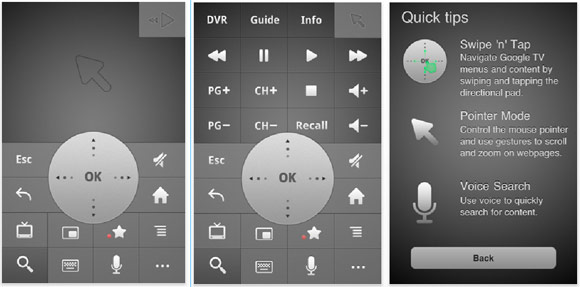
TV Remote app for iPhone, iPad and iPod touch; all you need is iOS 3.0+.
The video here shows exactly what the app is capable of, but here are
the basics: Your phone improves standard TV remote activities like
changing channels or accessing your DVR, and you can also interact with
your TV in ways you never have before. For instance, try using the voice
search to find your favorite shows and movies just by speaking into
your phone.


It's a free download, so you've nothing to lose. The only real downside?
The iOS version doesn't currently support the sharing of web pages from
phone to TV screen, but hopefully that can be added in a later release.

Wednesday, March 16, 2011

Google Revamps Its iPhone App


Thursday, February 24, 2011

How your smartphone's GPS can get out of a speeding ticket


AOL Original Content by Damon Lavrinc
from: http://translogic.aolautos.com/

Motorola Droid with MyTracks App

We've all have that friend-of-a-friend-of-a-friend who fought the law over an erroneous speeding ticket, but do you know anyone who's put their smartphone on the stand to prove their innocence? Well, you do now.

Sahas Katta got clocked by a cop doing over 40 in a 25 mph zone. He handed over his info and signed the ticket, but then remembered he was running Google MyTracks on his Motorola Droid. For the uninitiated, MyTracks is an Android app that uses the phone's GPS to record and plot where the user has travelled, allowing you to log a jog, bike ride or drive. After looking at the data and doing some research, Katta discovered that he never crested the 25 mph speed limit and decided to fight the ticket.

You can read the entire account over at SkatterTech, but for the tl;dr crowd, the cop didn't know the last time he went through radar training, when the gun was serviced or the unit's model number. OutFrontKatta then busted out the GPS data from his Droid, and after reviewing the evidence and Katta's clean driving record, the judge let him off. Granted, he may have just gotten lucky thanks to a uninformed judge and a hapless cop, but the results all the same. Lesson learned. You can download MyTracks here.

If you're not equipped with one of the dozens of Android-powered smartphones on the market, you've got a few alternatives. For the iPhone crowd, there are a myriad of GPS-tracking apps on the market, including the OutFront and myTracks (no relation to the Google-developed app). If you're packing a new Windows Phone 7 device, the pickings are slightly slimmer, but Marathon is porting over its popular Windows Phone 6 app to the new mobile OS and has included several social features into its updated app. TrackSpace and MojoTracker appears to be the best solution for Palm/HP WebOS devices and for those using a Nokia smartphone SportsTracker looks like the best bet.

Check out a videos demos below to get a taste of of OutFront and Marathon, and submit your own selections in the comments below.


[Source: SkatterTech]

Tuesday, January 11, 2011

Google Goggles Updated, Could Even Solve Sudoku Puzzles


googleThe world’s largest online search engine, Google, has updated its popular Google Goggles mobile search application, making it a whole lot smarter.
Google Goggles works by utilizing the camera in your smartphone to retrieve useful information in search results, essentially, you could snap pictures of objects, text, photos, people, landmarks, among other things, and the app then retrieves search results after scanning the photo.

In late August 2010, Google said it would release future updates that would make the app more effective with more relevant search results.

Since that announcement, today marks the biggest update the app has received.

ferrari-google-goggles
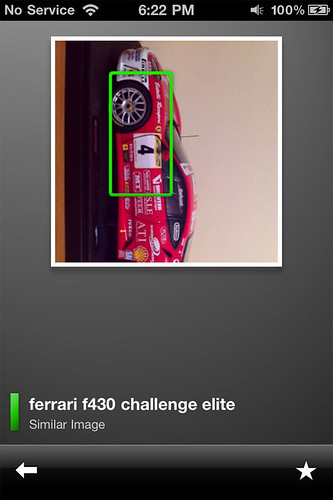
Photo picture search of a Ferrari model car in Google Goggles for iPhone

The latest Google Goggles version 1.3, available now in the Google Android Marketplace and the Apple iOS App Store, largely brings under-the-hood enhancements to take advantaged of improved algorithms that significantly increase the accuracy of the app when scanning things like a product barcode.

The company also improved the apps ability to better recognize content and other elements in magazines, including text, titles, people, and major corporate brands on magazine covers.

Google says the improved search results related to magazines work best for magazines published after August 2010.

One of the most impressive additions to the app is its ability to solve Sudoku game puzzles, by simply snapping a picture of the puzzle board; the app is able to analyze and easily and intelligently solve the missing numbers.

Although Google Goggles has been available in beta form for Android devices for about a year, the app only made its way onto Apple products late in the summer of 2010 after Google had difficulties in getting the app approved into Apple’s App Store.
 
In our testing, the application worked very quickly, but not very consistently in analyzing busier pictures.

For example, when a picture was snapped of a Ferrari model car, the app easily recognized the fact that it was indeed a model car, and even the type, but it also had difficulty recognizing popular brands on the car itself, but it was still fairly successful when closer range photos were snapped. Bar codes of popular products like Kellogg Corn Flakes worked seamlessly.


Friday, January 7, 2011

Trimensional: a 3D scanner for iPhone using just an app

By: Matthew Humphries
From: http://www.geek.com/


You may find it hard to believe, but it’s possible to capture 3D scans with your iPhone using just the screen and the camera. The solution comes in the form of an app called Trimensional.
The way in which it works is very simple, but the results are quite effective as the video above and images below show.

In order to work you need to turn the brightness right up on your iPhone display, then stand in complete darkness. Hold the phone screen up to your face (around 20cm away) with the Trimensional app loaded, and tell it to starts scanning.

The end result is a 3D scan of your face with the quality depending on how dark you managed to get the environment you are standing in.
Here’s the full feature list of the first version of the app:
  • Capture your own 3D scans
  • Browse your 3D scan library
  • Rotate and zoom your 3D models
  • Pick from 6 different 3D rendering modes
  • View a 3D slideshow
  • Email images directly to friends
  • Save images to camera roll for posting to the web
For $0.99 on the App Store it gives you a new way to capture images of yourself, friends, or random objects which you can then share with others over e-mail, or manipulate them directly on your phone.
The Trimensional website states it works best with iPhone 4 or the latest generation (4th) iPod touch. So if you have a previous generation phone or iPod check the iTunes comments first to see if anyone got it working.

One update we’d like to see to the app is the ability to export the 3D model in a standard format 3D art packages can handle.
Read more at the Trimensional website

Friday, December 17, 2010

New iPhone translator app instantly translates printed words using the camera


The unbelievable iPhone translator app, World Lens, auto-replaces the text with accurate camera mapping and instantly translates printed words from one language to another using the video camera on your iPhone,. No network delay, no roaming fees, and no reception problems.


Word Lens is a dictionary — evolved. It looks up words for you, and shows them in context. You can use Word Lens on your vacations to translate restaurant menus, street signs, and other things that have clearly printed words. It currently only supports Spanish to English annd English to Spanish.

Friday, October 22, 2010

Sleep Cycle for iPhone Picks the Best Time to Wake You Up

sleep cycle iphone app Sleep Cycle for iPhone Picks the Best Time to Wake You Up

Recently, a colleague of mine tipped me off to a new sleeping aid for iOS. Well, not an aid exactly, but an app that measures your sleeping patterns, and analyzes the data to determine the best window of time for you to wake up. Called ‘Sleep Cycle‘, so far I’m having nothing but success, and good dreams.
The way it works is actually quite simple. After you pop open the app and set the alarm time, you plug your iPhone in and set it display DOWN on the bed next to your pillow.

sleep cycle iphone placement Sleep Cycle for iPhone Picks the Best Time to Wake You Up

 What the app does from this position is use the built-in accelerometer to monitor your movement while you sleep. By monitoring your movement, it determines which ‘sleep phase’ you’re in… and in doing this, it picks the best time to wake you up, within a 30 minute window of the alarm time you initially set. So, you may be awoken up to 30 minutes BEFORE your set alarm time, but if you are, chances are you’ll feel rested and ready for the day.

While it’s still early days in my testing of this app, so far each time the alarm has gone off I feel stunningly awake and rested-up. This is a huge change for me. Getting out of bed is usually quite an ordeal for me, and I’ll linger beneath the sheets for 10 or 20 minutes, half-awake, like a zombie while I gain consciousness. Now, I’m not sure if this is all in my head, or just dumb luck, but so far I’m digging the app. By analyzing my sleep patterns, it appears to be picking the best time to wake me up… I’ve never felt better getting out of bed in the morning.

I encourage you to give it a try for yourself. Sleep Cycle is available for only $0.99 in the app store. In my books, it’s a buck well spent.

Sleep Cycle ($0.99) [iTunes link]

Thursday, September 2, 2010

Mercedes-Benz updates mbrace app with fancy pants 'Concierge' service

Mercedes-Benz just announced a new app that connects its in-car navigation systems with its customers' iPhones. Mbrace version 2.0 still lets drivers unlock their vehicles and, more importantly, find it in a crowded parking lot while adding location-based personal assistance ranging from entertainment, restaurant, directions, and traffic updates via Mercedes-Benz's Concierge service -- assuming you're are an mbrace PLUS customer. Destination information is then fired off directly to your in-vehicle navigation system to get you there. The updated app also includes enhanced Roadside Assistance that transmits the driver's location whenever a call is initiated. Think OnStar with a posh European accent.
Show full PR text
LEAVE THE CAR, TAKE THE CONCIERGE WITH YOU: MERCEDES-BENZ LAUNCHES NEW VERSION OF mbrace MOBILE APPLICATION

Mercedes Continues to Innovate with New Convenience and Location-Based Services

MONTVALE, Sept. 2, 2010 – As consumers increasingly turn to mobile devices to manage their lives from wherever they are, Mercedes-Benz USA (MBUSA) has introduced an upgraded version of its mbrace telematics platform that connects the in-car navigation system in its vehicles with drivers' iPhones. Developed by its partner Hughes Telematics, Inc. (HTI), the new mbrace Mobile Application version 2.0 allows Mercedes-Benz customers to take their mbrace services with them when they leave their vehicles. Mercedes-Benz is the first manufacturer to extend connected services in this way.

The mbrace Mobile Application version 2.0 builds on the automotive industry's first fully integrated smartphone application which was launched by Mercedes-Benz and HTI in November 2009. That application allows customers to use their phones to unlock their vehicles, locate their vehicles in crowded parking lots, and find nearby or preferred dealers among other services. Version 2.0 includes all of those features and also allows customers to seamlessly access Mercedes-Benz Concierge services while away from the vehicle. The concierge can access the caller's location information to deliver relevant entertainment recommendations, restaurant locations, directions, traffic updates and more. Requested destination information can then be sent directly from the concierge to an in-vehicle navigation system.

The new application also allows users to save multiple accounts in the log-in screen and assign nicknames, making it simple and quick to access multiple mbrace accounts from one device.

"Version 2.0 of the mbrace Mobile Application takes the convenience and connectivity of mbrace further than ever before, allowing customers to access connected services anywhere, anytime," said Sascha Simon, who heads up advanced product planning for MBUSA. "Imagine you're away from your car talking on your iPhone to Mercedes-Benz Concierge. The agent can provide you with a great restaurant suggestion and simultaneously send the destination both to your iPhone and into your car. That's what makes the system so great: the flexible architecture allows us to continually add new features as mobile technology evolves, keeping us on the cutting edge of innovation and connected services for our customers. This latest mobile application is a perfect example of that, and we will continue to add more features and connectivity on an ongoing basis."

In addition to the new mobile concierge service, Roadside Assistance on the iPhone also has been enhanced with the mbrace Mobile Application version 2.0 so that when a call is initiated, the customer's location information is transmitted to the Mercedes-Benz Roadside Assistance Center, allowing for more efficient and accurate service in the time of need. In instances when the vehicle may not be accessible, may not have power, or is in an unknown location, the mobile application allows Mercedes-Benz to help their customers by pinpointing exactly where to send assistance.

As the first automaker to offer a mobile application truly integrated with the vehicle, MBUSA continues to be an industry leader in bringing new connected technology to market. For customers on-the-go, the mbrace Mobile Application provides simple and seamless connectivity to the ever-expanding set of Mercedes-Benz mbrace services.

"Mercedes-Benz mbrace was designed as a platform for continuous innovation," said Erik Goldman, president, HTI. "The release of mbrace Mobile Application version 2.0 extends new services beyond the vehicle, giving Mercedes-Benz customers the freedom to seamlessly enjoy personalized service even when they're not in the driver's seat. We look forward to working with Mercedes to continue expansion of the mbrace Mobile Application service and feature set, enabling enhanced connectivity and interaction between the mobile device and vehicle."
sourceiTunes

Friday, August 27, 2010

10 iPhone Apps to Get You Back to School

By: Stephanie Marcus
From: http://mashable.com/


As August nights get cooler, we begin begrudgingly counting down the remaining summer days. Once Labor Day passes, it’s back to school time for millions.

The best part of going back to school is clearly the shopping. Even though a new notebook can go a long way in preparing you for the new year, the iPhone (iPhone) also has a ton of apps that will help to get you organized and in the right mind-space to focus and learn.

Last year we brought you 10 awesome applications and now we are updating and adding to that list, ensuring you have a smooth transition when returning to those hallowed halls.

From the college-bound to those who are still lucky enough to enjoy recess, here is a list of the best back to school apps.


1. Open Culture


Going back to school can be a shock to the system. You’ve probably spent the last few months relaxing, hanging out with friends, or transitioning from summer job mode. Hours of classes, papers and assignments can be rough, so to get yourself in a more intellectual space, you can check out Open Culture, which gives you free access to a huge selection of educational and intellectual audio and video collections.

Because acing school often has to do with time management, this app can really help you out in the multitasking department. Choose from a decent list of classics available as audio books while you do your laundry or hit the gym. The “Ideas and Culture” option has a lengthy list of podcasts and radio shows that will tune you into some striking commentary and analysis from some of today’s most interesting thinkers. There is also access to free university lectures plus foreign language lessons and scientific tutorials; as if you didn’t have enough to deal with.


2. Mental Case


Those first tests are but a few weeks away, and it’s up to you to make studying for them as easy as possible. For $4.99, Mental Case lets you create oh-so-handy flashcards on your iPhone. If you’re still leaning toward making them out of paper, then the added bonus of being able to record audio and insert images to the cards may sway your thoughts.

In addition to making your own custom flashcards, you also have access to FlashcardExchange where you can choose from over 21 million cards on a huge range of topics.

If you’d rather not spend all your time studying from your phone, you can download the flash cards to your computer.


3. Rate My Professor


A professor can often make or break a course. Some love teaching and really bring excitement and innovation to the lecture hall, while others have sleep-inducing voices and read straight out of the textbook. Rate My Professors is a useful app in deciding what courses you want to try to get into and which ones you should probably ditch before the add/drop period is over.

While versions of Rate My everything — from teachers, to doctors to dentists — have existed for years, this app is a great way to let other students know when your prof does something great or should just be avoided. You can tweet or post the messages to Facebook (), but use caution if you plan to publicize a bad review.


4. myHomework and iStudiez Pro


myHomework and iStudiez Pro are two apps we have reviewed before, but we simply can’t leave them off this list. myHomework is a free app that will help you stay afloat amidst the sea of assignments you’ll have to tackle.

Color coding helps you keep track of assignments in different classes, and when they’re due. If you are a great organizer, you can use the app to intricately plan how much of each assignment you want to accomplish and by what date to really keep you on track. The app has been updated since we last reviewed it, and you can now view your homework in a day or calendar view, as well as send homework reminders to friends.

iStudiez Pro is a paid app ($2.99) that will help you keep track of your student life. Here you can track your class schedule, so you aren’t missing lectures and ending up at the wrong end of campus, and you can also color-code each of your classes with their corresponding assignments, and be notified of their due dates on the apps calendar.


5. Free Translator


French class may be frustrating, but it’s not hopeless. Free translator is a great way to help you learn another language, as you can discover words that are more relevant to your life.

This app supports a ton of languages, so you even if your school doesn’t offer Polish or Korean lessons, you can learn a few things on your own. It also won’t hurt to have it handy when your French teacher calls on you in class.


6. Chegg


So this probably isn’t news to anyone entering or already in college; textbooks are expensive. Even courseware, which is often a compilation of photocopied texts, can run you hundreds of dollars. Since you probably just dropped a ton of cash on tuition, why not try and save some money where you can without sacrificing your education?

Chegg is a free app that does just that. It’s a textbook rental company with millions of titles to choose from, which is a real bonus considering you don’t have to brave the school book store and stand in line for hours.

You can search for your book by title, author or ISBN, or simply scan its barcode. The app is hellbent on saving you money, as you can compare Chegg’s rental price to the retail and in-store prices, so you know you are getting the best deal.

Since it’s a book rental app, you’ll have to part with the books eventually, which means you have to remember to return them. With all your work, that might be the last thing on your mind, but thankfully the app will send you gentle reminders so late fees don’t ruin the value of the service.


7. Blackboard Mobile Learn for iPhone


Blackboard is a platform that many schools use as way to communicate with students, as well as posting their grades and assignments to private student accounts. Many teachers and professors will direct their students to head to Blackboard to view next week’s lecture notes or find the link to a required reading. Having access to the platform on your phone can make keeping up with your assignments so much easier.


8. Quick Graph


For many of us, math is just not our thing. Those who get it and love it will probably adore Quick Graph, a graphic calculator with 2D and 3D capabilities. It’s also capable of displaying explicit and implicit equations as well as inequalities in both 2D and 3D, in all standard coordinate systems: Cartesian, polar, spherical and cylindrical. You can also share your results via e-mail or you can save them to your photo library.


9. Formulus Free – Formulas for Calculus


Even if you are a math-wiz, it’s hard to keep track of all those formulas. Formulus Free is an app that can help when your memory fails you. There is no more searching through pages of notes to find the right formula for your equation. The free app has all your algebra, geometry and differential equation needs in one easy-to-find place.


10. Free Books


So Free Books isn’t actually free, but you get a lot for its $1.99 price tag. Once you’ve paid for the app, you have easy access to 23,469 classics at the swipe of a finger.

While you won’t find modern titles, the classics — the ones you are likely studying in class — are all there. You can search for titles by name, or browse through them by genre or collection. Think of the money you’ll save not having to buy each book for your Lit class.

For those worried that they couldn’t read an entire book on their iPhone screen, fear not, as you can actually e-mail yourself a copy of the entire book so you can read it on your computer or download it to an e-reader.

iPhone App Uses Background Location for Automatic Checkins on Foursquare


Foursquare players too busy painting the town red to go to the trouble of whipping out their iPhone and checking in can sit back and let Checkmate do the work for them.

At $1.99, Checkmate offers a convenient alternative for those looking for a passive aggressive way to play the geosocial game. The brand new app harnesses background-running location on the iPhone (iPhone) to check in Foursquare (Foursquare) players automatically at specified venues.

After you download and fire up the app, you can select different venues to add to your “Auto Checkin Venues” list. You can toggle automatic checkins on or off for the whole list, as well as specify whether to automatically post a shout or share the checkin on Facebook (Facebook) and Twitter (Twitter). Once you’re within 50 meters of a designated venue, Checkmate will take over and check you in on Foursquare.

The application works on iPhone 3GS and iPhone 4 and eventually will add support for other checkin services.

Future Checkin [iTunes link] is similar in nature; it too supports automatic checkins for specified venues via background location on the iPhone. Future Checkin differs by letting you adjust the GPS settings for more accurate or more battery-friendly automatic checkins. Both applications warn that by running location in the background, you risk draining your phone’s battery.

Do automatic background checkins appeal to you? Leave us a comment and tell us why or why not.


Thursday, August 19, 2010

Verizon shows off iPad TV app and more


Verizon Fios TV iPad app

Verizon Fios TV subscribers will be able to watch live TV on an iPad using a new app due to come out sometime next year.

(Credit: Marguerite Reardon/CNET)

NEW YORK--Verizon Communications is prepping a new live TV streaming app for tablet PCs like the Apple iPad, a move that could eventually eliminate the need for a home set-top box and set the stage for true "TV everywhere" viewing.

At a demonstration at the home of Verizon CTO Shaygan Kheradpir, Verizon executives showed off a slew of new features for its Fios TV service, including the live TV streaming application on an iPad.

The new app allows Fios TV subscribers to stream live TV from their service onto an iPad over a home Wi-Fi connection. Initially, the service will work only in the home. But Kheradpir said that eventually the service could be offered as part of Verizon's TV-anywhere strategy, allowing people to access live TV anywhere they are using a username and password to authenticate the service.

"We built Fios TV as a cloud computing product," Kheradpir said. "The set-top box function is all done in software, and we simply redirect the broadcast TV signal to another screen. And because the set-top function is in software we can implement the functionality in devices."

Kheradpir said that the iPad is a perfect device for the application because of its elegant design. The large touch screen is big enough for comfortable TV viewing. And the device also turns on and off quickly, unlike many laptops, which take several minutes to boot up and shut down.

Verizon CTO Shaygan Kheradpir shows off a new app that allows people to watch live TV on an Apple iPad.

(Credit: Marguerite Reardon/CNET)

Eventually the app will be available for other tablet PCs as well as other connected devices, such as laptops and mobile phones.

"We have to start the engineering somewhere." Kheradpir. "And the iPad is an ideal device for this."

Kheradpir told journalists at the demonstration that the app is technically ready to go, but the company must wait until it has signed deals with content providers before it will go live with the service. The company is currently negotiating with several major cable and broadcast TV providers, such as Time Warner, to hammer out programming agreements.

"The engineering work is done," he said. "Now we have to work with the ecosystem and the content community to come up with equations that work for everyone."

The agreements that Verizon and other paid TV services make to offer certain TV channels as part of its service are for TV viewing only. Traditionally, content providers have negotiated separate agreements to stream live broadcasts on other devices, such as mobile phones.

Shawn Strickland, vice president of Fios product management for Verizon, said the company doesn't intend to pay content providers more to make programming available on multiple devices in the home. But he admitted that every negotiation with every provider is different.

Kheradpir made the argument that content providers actually benefit from allowing their programming to be viewed in this way. He used his own family as an example. He said that he and his wife watch CNN television all the time. But his 18-year-old daughter doesn't usually watch the cable station live. Instead, she checks the CNN Web site online in her bedroom on her laptop. Once Kheradpir started testing the new iPad app at home, his daughter altered her behavior.

"Now she takes the iPad to her room and watches the live CNN TV stream," he said. "So now CNN has won her back as a TV viewer instead of someone who only goes to the Web site."

Verizon executives said the new application will likely be available next year. But Kheradpir didn't rule out offering the new service sometime in 2010.

Reducing the number of set-top boxes
While there's no doubt the application extends where TV can be viewed, it also demonstrates how to cut down on the number of set-top boxes used in the home. Executives admitted that the set-top box won't go away entirely anytime soon, but as more functionality is pushed into the Verizon service cloud and more devices are equipped with software to render video signals on any device, there will eventually be less need for such devices.

"This is more economical for us," said Strickland. "We don't have to spend the capital to put boxes everywhere."

This proposition may not sit well with the two largest companies that make set top-boxes: Motorola and Cisco's Scientific Atlanta. These companies already have a lock on the set-top box market. For years the FCC has been trying to break the market to allow for more innovation in the set-top market. In fact, the National Broadband Plan the FCC developed earlier this year, has a section describing the need for more competition in set-top boxes.

Kheradpir said eventually this will be unnecessary.

"The FCC is trying to solve a problem that doesn't exist anymore," he said. "They are 20 years behind. The world has moved on. We are way ahead of what they are thinking with what we have done with the software."

Verizon is nearing the end of its $23 billion project to wire two-thirds of its territory with fiber to the home connections. The company now has 3.8 million customers for Fios Internet and about 3.2 million for Fios TV, according to the company's second-quarter results. The infrastructure makes service available to roughly 18 million people, and Verizon is now in the process of expanding its customer base within the existing territories where it has built the network.

The new streaming app for Verizon Fios TV will eventually allow subscribers to watch live TV and video on demand on any device, anywhere.

(Credit: Marguerite Reardon/CNET)

Since the company launched the Verizon Fios TV service, it has continually upgraded the features of the service, giving subscribers additional content and features at no extra cost. On Wednesday, the company announced a slew of new offerings that will be available to all Fios TV subscribers by the end of the year.

In an effort to compete with over-the-top Internet offerings and some offerings from competitors such as Comcast, Verizon will soon offer movie purchase and rental options and a three-screen or "Flexview" option that allows subscribers to view digital rights-protected video content to be shown on up to five other devices.

Standard-definition and high-definition movies can be bought or rented for between $2 to $18. Files that consumers own, they will own for life, even if they leave the Fios TV service. Most video rentals expire within 48-hours after the first playback.

Verizon is also allowing subscribers to store their own personal content, such as pictures, video, and music in the cloud with the option to listen or view the content anywhere there is an Internet connection using a Fios app.

At launch, the movie and personal content apps will be accessed on a number of platforms, including Mac and PC computers, as well as mobile-phone platforms Google Android, Research In Motion, and Windows Mobile. An app for the iPhone is coming, but Verizon executives said they are unsure when the app will be approved and available.

The video and personal media can be streamed over Wi-Fi, 3G, and 4G networks, regardless of provider. The only limitation is that the service is available on up to five devices at any given time. But executives said they have made it easy to authorize and de-authorize devices to accommodate usage on many devices. And if the company finds that more device authorizations are needed, it will eventually bump up the number.

These services will be offered to Verizon Fios TV customers later this year at no additional charge.

Monday, July 26, 2010

The Top 100 Free Apps for Your Phone 2010

By: PCMag.com Staff

Whether you're toting an iPhone, Droid, BlackBerry, or Palm Pre, it's the apps that make your smartphone brilliant. And the app scene is booming. The iPhone still leads the app race, with more than 225,000 apps, but developers are churning out apps for other platforms as well. Google's Android Market now has over 60,000 apps. Palm's App Catalog for the Pre and Pixi has risen from hundreds to more than 2,000 apps during the past several months alone. And there are thousands of apps for BlackBerry, Windows Mobile, and Symbian phones.

Six months ago, when we did our first "Top 100 Free Mobile Apps for Your Phone" story, our focus was clearly on the iPhone. The same holds true this time around, though we did rejigger the number of apps we cover for each of the other smartphone platforms.

While the iPhone isn't the number-one smartphone platform in America (that's BlackBerry), iPhone owners download more apps than owners of competing devices. We boosted our Android selection to 30 apps to reflect the huge number of Android-powered phones hitting the marketplace right now. Verizon and Sprint, especially, have been enthusiastic about Android, offering Google's OS as their hottest smartphone platform right now.

Palm's webOS now gets its own list of 10 free apps, as Palm phones are now available on Sprint, Verizon Wireless, and AT&T, and HP has said it's going to "double down" on the Palm system. The Symbian operating system gets a list of five free apps: Nokia's smartphones have barely hung on in the U.S. market.

The losers in this roundup are RIM's BlackBerrys and Microsoft's Windows Mobile phones. There are millions of BlackBerrys in the U.S., but our readership statistics have shown that BlackBerry owners are less interested in reading about apps than users of other platforms. That may be because RIM's App World is still difficult to use, and BlackBerry owners can find it difficult to figure out where to download their favorite apps.

Microsoft's Windows Mobile is in a chrysalis right now, as it transforms into Windows Phone 7 later this year. Microsoft shifted most developers' interest away from Windows Mobile 6.5. But because there are still millions of Windows Mobile 6.5 phones in consumers' hands, we're giving you five great free apps for that platform.

Given the thousands of great free apps out there, we know that our list can't possibly be comprehensive. If you know of some, jump over to the appropriate platform page and add your suggestion to the Comments area.

The Top 40 Free iPhone Apps
The Top 30 Free Google Android Apps
The Top 10 Free BlackBerry Apps
The Top 10 Free Palm webOS Apps
The Top 5 Free Symbian Apps
The Top 5 Free Windows Phone Apps

Sascha Segan, Gregg Binder, Sean Ludwig, and Jamie Lendino contributed to this report.

Monday, April 26, 2010

Concert pianist plays iPad onstage


One of the world's foremost concert pianists has taken the iPad to a place it has surely never been. Yes, away from the thighs, where the device so often rests.

A few days ago, wandering onto the stage to perform his first encore at Davies Symphony Hall in San Francisco, China's Lang Lang, one of the world's most dazzling piano players, proved the product's astounding versatility. The audience was clearly surprised he emerged clutching an iPad. They could be sure he wasn't going to use it to take a shot of the audience. But perhaps he needed to send an e-mail. Concert pianists are busy people.

Yet, no. For Lang Lang is a man who keeps time while being ahead of it. No sooner had the audience paused for a last cough than he broke into Rimsky-Korsakov's "Flight of the Bumblebee" with the help of the Magic Piano iPad app from Smule.
 
He held his iPad aloft. He placed it on the piano, while his left hand stroked his Steinway (yes, he's a Steinway man) and his right tickled his iPad. He even let a bemused conductor, who cursorily resembled a relative of Ben Kingsley and Dr. Evil, share in the experience.

As you can see from the video, Lang Lang's thighs were only used to sway a little to the music.

Monday, March 22, 2010

LaDiDa iPhone App Lets Anyone With a Voice Make Music in Seconds

By Eliot Van Buskirk Email Author
From http://www.wired.com/

AUSTIN, Texas — Outside of isolated cultural pockets — the Irish countryside, Appalachia and church among them — most people think of music as something other people make for them to enjoy. But as anyone who sings or plays an instrument knows, making music can be a deeply satisfying act, and it’s a shame that more people don’t get to do it.

The husband-and-wife team behind LaDiDa — Khush CTO Parag Chordia and CEO Prerna Gupta — have devised a “reverse karaoke” app that makes it simple for anyone with an iPhone or iPod Touch to make songs with full instrumentation using only their voice.

You don’t even have to be able to sing in tune in order to use the $3 app, which was approved last fall. In the demo video above, Chordia, who is also an assistant professor of music at the Georgia Institute of Technology, sings absolutely terribly to show that, really, anyone can do it. (It’s quite difficult for a trained musician to sing that poorly, so he’s been practicing.)

The app is impressive. It creates harmonic and rhythmic elements after you’ve recorded yourself singing anything you please, whether it’s a pop song cover, “Happy Birthday” or something original. LaDiDa corrects your pitch and adds some reverb (just like the pros do), then aligns it with these elements and plays it back in a variety of styles that you can toggle through until you find the one that sounds best.

From there, the app lets you easily share your creation through Facebook or Twitter. As Gupta suggests, a great use of LaDiDa would be to sing “Happy Birthday” for someone and send it to them electronically, although that’s really just the tip of the iceberg.

LaDiDa is available in the iTunes store for $3 (iTunes link).