Zazzle Shop

Screen printing
Showing posts with label ipod accesories. Show all posts

Friday, September 30, 2011

iTree: An iPod Dock Made from a Tree


The iTree is a top-quality iPhone and iPod docking station made out of a simple tree trunk. This is hollowed out using a special technique and specialized tools, expertly proportioned to produce optimum sound quality.
Each iTree is unique – costumers choose the wood, the length and the built-in technology. They can even take a ride through the forest and pick out their own tree. The iTree is then made by hand in the “Steirische Vulkanland” region of southern Austria by carpenters “Tischlerei Lenz”, keeping the iTree local. There are currently three types of iTree – cherry, poplar and spruce – however, almost any kind of wood can be used. The iTree is compatible with any iPhone, iPod docking station, W Lan stream unit or CD player. It can even be fitted out with a turntable.
 
Designers KMKG believe that good design is based on experience, it’s personal, it has a “Heimat” (“home”) and has as little design as possible. Just like the iTree.


Technical Information:
Dimensions
Width: ~200 up to 400 cm
Diameter: starting at 35 cm
 
Sound by Trenner & Friedl
Bandwith: (-3db) 45Hz – 40.000Hz
Impedance nominal: 4 ohm
Sensitivity: (2.83 V /m) 88db
using finest paper cones
 
Wood
currently available: cheery, poplar and spruce
 
Compatibility
iTree is compatible with any Apple iPod, iPhone
or iPad using the Apple dock connector
 
Wireless
The wireless version is using the wireless
streaming technology from ARCAM


Facts
City: Graz
Country: Austria
Client: Studio project
Year: 2010
Credits:
Trenner & Friedl
www.trenner-friedl.com/

Tischlerei Lenz
tischlerei-lenz.at/


<p>full view of ‘iTree’</p>
full view of ‘iTree’
 

Tuesday, May 10, 2011

Cellphone motion projector throws gaming onto the wall

Mike Fitzpatrick, contributor
From: http://www.newscientist.com/


In 19th century Japan, a form of theatre known as Utsushi-e, which used light from lanterns to project stories and images onto rice paper screen, was hugely popular.

Now Disney has used this pre-cinema artform as its inspiration for a modern equivalent: a projector for your smartphone.

Many cellphone sold in Japan and Korea already have tiny "pico" projectors embedded in them -- handy for catching a film on your hotel room wall. Disney appears to be thinking ahead for western smartphones and is already developing game applications for such phones, which it will reveal for the first time at CHI 2011 conference.

Led by researcher Karl Willis and Ivan Poupyrev at the Disney Research labs in Pittsburgh, Pennsylvania, the MotionBeam project explores the use of hand-held projectors to interact and control projected characters in games played as the images are thrown onto a wall.

One of the first Motion Beam games lets the user control a small yellow character which scampers across the wall collecting stars as it goes. The user guides the figures by gesturing with the handheld projector itself as if it was a torch, and interacting with the game as it is projected onto a white wall.

The prototype combines an iPod Touch, a laser projector, and a microcontroller-sensor unit. The attached sensors include an accelerometer and gyroscope to detect the smartphone's movements as well as an ultrasonic distance sensor to work out how far the projector is from the viewing wall.

Disney says it was inspired by Utsushi-e as well as the European belt-mounted magic lantern from 1823 that was used to give a sense of movement to still images of the time.

Monday, March 14, 2011

Five Excellent (Yet Free) Video Converters For Your iPhone And iPod

By Umar Anjum

From: http://www.smashingapps.com/

Smashing Apps has been featured at Wordpress Showcase. If you like Smashing Apps and would like to share your love with us so you can click here to rate us.

  Advertisement
As entertaining as they are, unfortunately portable media players cannot handle all media types you throw at them. Unless there comes an all-format-accepting portable media player, we have to use video conversion software to transform our media type before our iPhones and iPods can play them.
For my fellow iPhone and iPod owners who are looking for a competent yet free software solution for video conversion, here are 5 of the best options available online. I am sure that you will find them as useful as I did.

FreeStudio

clip_image002
FreeStudio is DVDVideoSoft’s handy video conversion freeware that will excellently suit iPhone and iPod video conversions. The application is compatible with Windows computers and facilitates various video format conversions. While its download size is quite high – 58MB – the features surely justify it.

Daniusoft Video Converter Free

clip_image004
In addition to iPods and iPhones, Daniusoft Video Converter Free also supports video conversions for PSP, Zune, and other cell-phones and portable media players. The download is 12MB, much smaller than the abovementioned program. Supported media formats include AVI, MP4, WMV, MOV, MPEG1, MPEG2, FLV, MP3, WAV, and WMA. You can install Daniusoft Video Converter Free on your Windows computer.

Any Video Converter Free

clip_image006
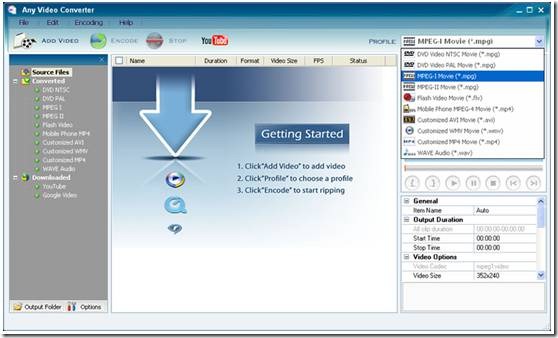
Any Video Converter Free is a personal favorite of mine because it excellently blends functionality with an appealing user interface. A wide variety of media formats are supported and converting video for your iOS device will be very easy. You can control advanced conversions options as well such as video and audio bitrates.

Quick Media Converter

clip_image008
Quick Media Converter comes in the setup size of 28MB. Along with supporting video conversions between various file formats, it provides a progress bar with each conversion process so you know how much of the process has completed and how much is left.

Format Factory

clip_image010
Although Format Factory does not offer the prettiest user interface, it does offer the most functionality out of the other entries in this list. Supporting media conversions between various video, audio, and image formats, Format Factory can quite easily become your default media conversion application. The program has a setup file size of 38MB.

Friday, December 3, 2010

Klipsch issues first on-ear headphones, Image S5i Rugged and bargain Image S3 earbuds

It's been awhile since we sashayed through Klipsch's world headquarters back in December of last year, but the company certainly hasn't let off of the pedal. Today at IFA, it managed to introduce no fewer than three new headphones, including the outfit's very first on-ear set. The Image One was built to bring Klipsch's signature sound to folks who'd prefer cans over 'buds, and it's also amongst the first to have an Apple-centric mic and three-button remote for controlling music playback on iPods, iPads and iPhones. Travelers will be pleased to hear that the ear cups fold flat for portability, but you'll need $149.99 to call 'em yours when they ship this November. Moving on, there's the Image S5i Rugged (shown above) -- essentially, you're looking at the same sound quality we lauded last year, but with a rugged slant. These feature the aforesaid three-button remote / mic as well as a "safety case" that touts a built-in flashlight. We're expecting a demonstration of their toughness at IFA tomorrow, but in the meanwhile you can start sacking away $129.99 for their November debut. Finally, the October-bound Image S3 is the company's new low-end set, priced at just $49.99 but still shipping with a trio of oval ear tips, a carrying case and a choice of gray, red, pink or green hues. The full presser is after the break, if you're into that type of thing.
Show full PR text
Klipsch Broadens Headphone Offerings with Three New Designs

INDIANAPOLIS (September 3, 2010) - In just three years, Klipsch has carved out a niche in the heavily saturated headphone market by manufacturing products designed to offer unequaled comfort, noise isolation and musical accuracy at any price point. Today, the company plans to build on its success with three new headphone models catering to cost-conscience consumers, athletes and people who prefer on-ear solutions.

Ranging from $49.99 to $149.99 (US MSRP), these headphones maintain the same high-quality sound signature and comfort levels as previous Klipsch headphones, but introduce enhancements in design, cabling, performance, packaging and accessories. These new models join the existing Klipsch headphone line, which includes the best-selling Image S4, Image S4i and Image X10i.

Image One

The Image One brings high-performance Klipsch sound to people who prefer an on-ear design. Not only is it the company's first on-ear headphone, it's among the first to feature an Apple-based mic and three-button remote for taking calls and controlling music on iPods, iPhones or iPads. Each lightweight, pivoting ear cup features premium leather and high-density memory foam for comfortable wear and superior passive noise-isolation, designed to block out ambient noise and provide enhanced bass. The ear cups fold flat for placement inside the included carrying case. Purchase these sleek headphones for $149.99 (US MSRP) at authorized retailers and klipsch.com in November.

Image S5i Rugged

Extremely durable and perfect for active outdoor lifestyles, the Image S5i Rugged in-ear features a mic and oversized moisture-resistant three-button remote to put music and phone call controls at your fingertips. Offering bold styling, highly intelligible phone calls and full music and/or voice control on select Apple products, these headphones retail for $129.99 (US MSRP). Available in a black finish, the Image S5i Rugged comes with three pairs of different-sized patented oval ear tips and a heavy-duty safety case with a built-in flashlight and removable belt clip. Purchase the Image S5i Rugged at select retailers and klipsch.com in November.


Image S3

These affordable in-ear headphones offer a major boost in sound and comfort over similarly priced competitor models. Available in a gun metal gray, red, pink or green finish, the Image S3 accommodates virtually any device with a standard 3.5mm headphone jack. It comes with three pairs of different-sized patented oval ear tips and a carrying case. Purchase the Image S3 for $49.99 (US MSRP) at select retailers and klipsch.com in October.

Friday, December 11, 2009

The Evolution of the Pocket Protector: Thomas Pink's iPod Necktie, Nerdy No More

Is this nerdy, or isn't it? I honestly can't decide. It's a necktie that holds an iPod Nano, essentially a less dorky version of the quintessential old school nerd pocket protector. Note that the colors correspond with the iPod colors. It's called "The Commuter Tie," and is made by Thomas Pink of London. Their site says, "The music player is placed in the pocket to avoid having expensive devices on display or damaging the line of one's suit."

Avoid damaging the line of one's suit? Okay, maybe it's not nerdy. Maybe it's just gay.

I suppose the next step up from this would be a necktie that holds an iPhone. The tie would have to get bigger, or the iPhone would have to get smaller.

necktiescolor.jpg
​
blueoverview.jpg
​

bluenecktie.jpg
​

The Thomas Pink Commuter Ties cost 55 pounds sterling. Or, for around four U.S. bucks, there's always these, from PocketProtectors.com. One even has a built-in badge holder. Kurt Lammon, the guy who founded PocketProtectors.com says he started the site "because, one day, after many years of daily use, I realized that my faithful old protector was starting to look very tired. I made several efforts to locate another good one at the major retail outlets and drug stores, but to no avail." He has since shipped thousands of pocket protectors all over the world. Awesome.

15_itemimg.jpg
"The Invisible"
​"Go totally incognito with the totally clear Invisible." It's their most popular model. And yes, so incognito! Why, I don't notice it at all.
18_itemimg.jpg
"The Stealth"
​
"The Stealth," which "hides discretely (sic) in your pocket."
20_itemimg.jpg
"The Badge Holder"
​
"The Badge Holder" for those who need to hold badges. Obviously.

Wednesday, March 18, 2009

10 gadgets to get the most out of your iPod

From watching videos on your tv to controlling your ipod through your voice. These ten gadgets can redefine the way you use your ipod.

You and Your iPod: It's All About Control
1. Apple Remote App
1. Apple Remote App
2. DLO HomeDock Music Remote
3. Logic3 i-Station 25
4. Accenda Voice Control for iPod
5. Griffin iTrip AutoPilot
6. Apple Universal Dock
7. Keyspan TuneView Pro for iPod
8. Logitech Pure-Fi Dream
9. Sonos Controller for iPod touch
10. iLuv Desktop iPod/DVD Player

Monday, March 9, 2009

Japanese gadget controls iPod in blink of an eye

by Miwa Suzuki The new gizmo -- called the "Mimi Switch" or "Ear Switch"

Enlarge

A wink, a smile or a raised eyebrow could soon change the music on your iPod or start up the washing machine, thanks to a new Japanese gadget. The device looks like a normal set of headphones but is fitted with a set of infrared sensors that measure tiny movements inside the ear that result from different facial expressions.

A wink, a smile or a raised eyebrow could soon change the music on your iPod or start up the washing machine, thanks to a new Japanese gadget.

The device looks like a normal set of headphones but is fitted with a set of infrared sensors that measure tiny movements inside the ear that result from different facial expressions.

The gizmo -- called the "Mimi Switch" or "Ear Switch" -- is connected to a micro-computer that can control electronic devices, essentially making it a hands-free remote control for anything.

"You will be able to turn on room lights or swing your washing machine into action with a quick twitch of your mouth," said its inventor, Kazuhiro Taniguchi of Osaka University.

"An iPod can start or stop music when the wearer sticks his tongue out, like in the famous Einstein picture. If he opens his eyes wide, the machine skips to the next tune. A wink with the right eye makes it go back.

"The machine can be programmed to run with various other facial expressions, such as a wriggle of the nose or a smile."

The Mimi Switch could also store and interpret data and get to know its user, said Taniguchi, chief researcher at Osaka University's Graduate School of Engineering Science in western Japan.

"It monitors natural movements of the face in everyday life and accumulates data," Taniguchi told AFP in an interview. "If it judges that you aren't smiling enough, it may play a cheerful song."

Some may use the device for relaxation -- perhaps by changing music hands-free while reading a book -- but Taniguchi said it could also have more serious applications to make people's lives safer and easier.

"If the system is mounted on a hearing aid for elderly people, it could tell how often they sneeze or whether they are eating regularly," he said.

"If it believes they are not well, it could send a warning message to relatives."

The device could also serve as a remote control for appliances for physically disabled people, from cameras and computers to air conditioners, or alert medical services if a person has a fit, he said.

The Ear Switch follows on from an earlier device called the Temple Switch that was small enough to fit inside a pair of eyeglasses and also read the flick of an eyelid.

"As the ear switch is put in the ears, its optical sensors are unaffected by sunlight," Taniguchi said.

He said he was planning to patent his new device in Japan and abroad, work on a wireless version, and seek corporate funding to market it for practical uses -- something he expected might take two or three years.

(c) 2009 AFP

Friday, March 6, 2009

The 5 Best iPod Car Adapters, and How to Install Them

So your car doesn't have an iPod dock. Rather than scrapping your mp3 player for burned cds, (or scrapping your car, for that matter) owners of dockless vehicles can patch together a method for streaming their MP3s through the built-in stereo. Effort and expense will vary, and some setups will sound much better than others. Here are five options to connect your iPod to your car.


Option 1: Wireless FM Transmitter

INSTALLATION: Easy
SOUND QUALITY: Poor
FM transmitters are the most popular and convenient way of playing an MP3 device through a car stereo. They typically plug into an iPod’s dock or headphone jack to create what is essentially a low-wattage pirate radio station—powerful enough to be picked up by your car radio inches away, but not strong enough to interfere with neighboring car radios. Unfortunately, these transmitters need to compete with real (and far more powerful) radio stations and are easily swamped by 6000 watts of classic rock. When this happens, the sound that comes out of the speakers can be a cacophonous mix of static, local radio stations and whatever your iPod is playing. This problem is exacerbated by FCC regulations, which prohibit FM transmitters from broadcasting at greater than 18.75 nanowatts, essentially ensuring that they won’t work well. And while this problem is particularly pronounced in cities with crowded airwaves, the issue exists nearly everywhere in the country. There’s another downside to FM transmitters: Even under ideal conditions, FM radio just can’t deliver excellent sound quality.

That being said, FM transmitters are extremely convenient and, with many models selling for as little as $15, affordable. If you decide to use one, choose a model that lets you pick any FM frequency (some restrict you to a few stations on the top or bottom of the spectrum). This will increase your odds of finding an open channel.

Option 2: Cassette Adapter

INSTALLATION: Easy
SOUND QUALITY: Good
Audio cassette adapters take advantage of an increasingly rare feature: a car’s tape player. These adapters are shaped exactly like a cassette tape. They are cheap (around $15), commonplace and deliver decent sound quality. To use one, simply plug one end into the MP3 player’s headphone jack and the other into the tape deck. If your automobile has a cassette player, there is no easier way to get interference-free listening.

Option 3: Wired FM Modulator

INSTALLATION: Moderate
SOUND QUALITY: Good
With wireless FM transmitters, the signal has to travel through high-traffic airwaves on its way to your car antenna. Wired FM modulators, which usually come as small boxes with a few cords running out from them, intercept the connection between the car’s antenna and radio, allowing you to inject your iPod’s signal directly into this wired pathway. The result is dramatically improved sound quality—although the final result is still hampered by the limitations of FM radio, which is far from audiophile-friendly.

These modulators are inexpensive (they can be found online for as little as $15) and relatively easy to put in, as long as you are comfortable fiddling with your car stereo’s wires. To install one, position yourself underneath the dash. Reach up and unplug the antenna from the back of the stereo and plug it into the modulator’s antenna input. Take the modulator’s output cord and connect it to the stereo’s antenna input. You can then set the modulator to run at any FM frequency. Pick one with weak competing signals (usually at the very top or bottom of the spectrum), and plug the modulator’s audio output cord into your iPod’s headphone jack.

Option 4: Stereo With Line-In Port

INSTALLATION: Moderate
SOUND QUALITY: Very Good
If you’re lucky, your car stereo has a headphone-size line-in port right on the front. If so, all you have to do is jack your MP3 player into this hole, tune your stereo source to “Auxiliary,” and crank some tunes. Unfortunately, most car stereos lack this port. Installing a new car stereo that has one is one method for getting excellent sound using your iPod. New stereos with the port can be purchased for under $100 and installed either by you or a professional. (Some shops offer free installation with purchase.)

Option 5: RCA Port

INSTALLATION: Moderate
SOUND QUALITY: Very Good
Some car stereos—primarily ones with CD players—include an RCA jack in the back. Hijacking this audio connection from the CD player will provide excellent sound quality for music coming off an iPod. First step: Remove the stereo. If there is an RCA port, you will see dual jacks—one with a red and one with a white input (similar to the RCA jacks on home stereos). RCA-to-headphone cords can be bought for a few dollars at just about any electronics store. Plug the red and white ends of this cord into the stereo’s RCA jack and the other end into your MP3 player’s headphone jack. Finally, tune your stereo to either “CD” or “Auxiliary” (the exact setting depends on your stereo).

Tuesday, November 18, 2008

IPod Speakers Made From Paper Cups and Sticks

By Charlie Sorrel Email

cup_speakers3.jpg

Next time you're down at the diner you might try out the CupSpeakers from Dmitry Zagga. His minimalist speaker design consists four paper cups, a couple of toothpicks and an iPod.

It is, as he puts it, an iPod Ghetto Accessory. There's something very right about these cheap horn speakers -- the clean white lines perfectly match the 2003 2G iPod. But we very much doubt the sound would be louder than that from the earbuds alone. On the other hand, they're likely to be a lot better than some passive speaker systems you can buy.

Product page [Zagga via Yanko via Cult of Mac]

Monday, November 17, 2008

The World's Most Expensive Earphones Go On Sale!

They're complete with 118 diamonds...

The World's Most Expensive Earphones Go On Sale!

The world's most expensive earphones have gone on sale for a massive $5,200.

Made by specialist Belgian jeweller Casa Di, the blingtastic ear pieces are made from 18 carat gold and are encrusted with an impressive 118 diamonds.

Each earphone weighs a relatively heavy 18grams and come with 59 diamonds each. The limited-edition run are on sale at selected jewellers around the globe.

Earlier this week Gigwise published a blog on how the return of bling to hip-hop could rescue the globe from its financial crisis. CLICK HERE to read it in full.

The world's most expensive earphones:

Previous Next

Thursday, November 13, 2008

iPod vibrator? Yes, THAT kind of vibrator...

Naughtibod


At first glance, we figured the Naughtibod to be a great adult iPod accessory and a fantastic gift for audiophile sweethearts, and possibly a good first-time personal vibe for Shuffle-toting folks who might shy away from the more garden variety of the species. And it very may well be all of that, but with a few practical caveats.


The Naughtibod does exactly what it promises, which is that it's a silky plastic, petite vibe that buzzes with or without music. Run on batteries, the toy functions nicely with fast and slow speeds or a variety of pre-programmed rhythms including pulsing, throbbing, and escalating repetitions such as the "roller coaster”--slow up-and-down in vibrational intensity. Which is all fun stuff that sets the cute, tastefully designed vibe apart from most basic store-bought buzzers.


naightibodThe music function requires switching end caps and attaching something that is non-ironically referred to as the Freedom Cord, prompting us to wonder if perhaps the cord was once referred to as a French Cord. With your Freedom Cord in place--including a splitter headphone jack at the base--the vibe attaches to any audio device.


We found it plays nicely with laptops, iPods of all shapes and sizes, and our old iMac and both iPhone and iPod touch. However, the true audio snob, the nervous first-timer and anyone who wants to hear the music they're playing will find that the louder you crank the music the more intensely--and loudly--the Naughtibod vibrates. Even if your iPod goes to 11, you’ll inevitably hear the tiny toy over the music.


Thinking that perhaps Nirvana might not get us to nirvana, we switched to some trip-hop, attempted to cool down with the dream-pop sounds of Mazzy Star, and then tried to find a stable beat with some old school hip-hop. No matter how we dialed it in, the vibe didn't respond to the beat reliably. It was sometimes a second behind, and the louder our iPod, the more we just got a steady, muddled buzz. At which point we were inextricably tangled in the Freedom Cord, and decided to end the experiment before someone lost circulation… or an eardrum.

Violet Blue is an author and columnist for the San Francisco Chronicle. Visit her blog at TinyNibbles.com.

THE BOTTOM LINE
It’s cute and non-threatening for newbies, but the Naughtibod can get distractingly loud

Naughtibod
COMPANY: OhMiBod
CONTACT: www.ohmibod.com
PRICE: $69.00
REQUIREMENTS: None. Works with all MP3 players.
Compact. Batteries included. Doesn't look like a scary alien sex toy. Music is optional. Variable speeds.
Cheap lightweight plastic feel. N batteries are weird. Tethered during iPod use. Loud like a hive of angry bees.