Zazzle Shop

Screen printing
Showing posts with label netbook. Show all posts

Monday, June 13, 2011

Samsung Series 5 is the First Chromebook

From: http://www.geekwithlaptop.com/


The Samsung Series 5 is the first ever Chromebook, featuring a 12.1 inch screen and an Atom N570 dual core processor. In many ways, this is the first ever true netbook, because going on the Internet is pretty much all it can do.

Initial reviews of the Series 5 have been mixed, although I think it is fair to say that most people are pretty unimpressed. While there is nothing wrong with the “browser in a box” philosophy per se, I think most of us were expecting a much smaller and lighter box for a computer that can basically only run a browser.

The Samsung Series 5 netbook features 2GB of RAM, a 16GB solid state drive, a couple of USB ports, a VGA dongle, a SIM card slot, an SD card reader, and a standard mic/headset port. This is pretty much as basic as it gets, and there is no HDMI, no Ethernet, and no Bluetooth to spice things up.

However, Google are talking up the user experience of this netbook more than the spec sheet, and it is here where this computer has a chance to redeem itself. Google are promising a very fast boot time, with the netbook said to be ready in under 12 seconds. The battery is also being reported to go for at least 8 hours, and the entire file system is encrypted to avoid virus infections.

The Chrome browser lies at the heart of the Series 5 Chromebook, although Google have thrown in a basic file browser and media player. However, basic functionality like listening to music is all dependent on the browser, the cloud, and a WiFi connection, because you can’t store much on the small internal flash memory.

As many analysts have been predicting and many reviewers are now saying, these Chromebooks feel a little like an experiment. Users are simply not used to living entirely on the Internet, and depend on their desktop for a variety of things. While the first ever commercial “Internet OS” netbook may be a great item in computing museums in years to come, this first Chromebook appears to make much less sense as a practical option in 2011.

Tuesday, April 13, 2010

WePad comes out of tablet hiding, reveals its €450 price and August availability

There's no I in pad. Only we, of course. Yeah, we've been wanting to make that joke for awhile -- but in all seriousness, Neofonie, makers of the 11.6-inch WePad, held a press conference in Berlin today to reveal a bit more about its Linux-based slate. According to our German counterparts there will be two versions of the Intel Atom N450-powered tablet, which has two USB ports and an onboard webcam -- the 16GB / WiFi version will go for €450 and the 64GB / HD capable model for €569. We're a bit intrigued by the promised "full HD" support of the larger version, but Neofonie was quick to say that there is no NVIDIA inside. Hmm... Broadcom's Crystal HD, perhaps? The company wasn't willing to let reporters play with the early build of the multitouch device, but they did show off some videos of the Linux interface. You can watch a few after the break, but the live widget-based GUI looks extremely attractive and amongst other things, the browser supports Flash. It sort of hurts that we won't be able to get our hands on one until August, but we're happy to hear that the company, unlike some others, is taking the time to get things right.

Updated: We can't help but laugh at the fact that many sites are reporting that the WePad on display at yesterday's press conference was actually running Windows 7 underneath the Linux-looking UI. Apparently the company has more work to do than we originally thought.


sourceWePad, Engadget German

Tuesday, January 5, 2010

An Affordable $199 Tablet for Everyone -- And It's Not From Apple


Daniel Ionescu, PC World

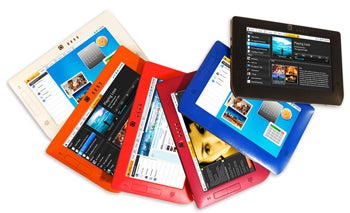
Just as the rumors of a pricey Apple tablet computer have reached a high-water mark, Freescale Semiconductor on Monday showcased reference designs of an affordable, lightweight tablet computer, which is set to hit the market later this year.

Freescale, which supplies the guts for this new breed of computers called smartbooks (about one third the size and volume of a typical netbook), is putting its weight behind this category with a concept of what could become everybody's tablet.
The Freescale tablet reference design (pictured above) has specifications close to what we have been hearing about the mythical Apple tablet: a 7-inch touch screen, 3-megapixel camera and various sensors such as a three-axis accelerometer and an ambient light sensor.
Next to the 512MB of RAM, up to 64GB of internal storage (microSD expansion) and a 1GHz processor, Freescale's smartbook tablet features a potentially killer spec: a $200 price tag. Next to an Android or Linux operating system, it also includes Wi-Fi and Bluetooth connectivity and options for a 3G modem.

The smartbook reference design is intended to run everyday-use applications such as a Web browser (with Adobe Flash support), an e-mail client, an RSS reader, social networking tools, and an office suite, among others.
So far, no one has had a chance to have a deeper look at Freescale's holy grail smartbook, but the chipmaker is planning to demonstrate the design at the 2010 Consumer Electronics Show (CES) later on this week.
If manufacturers pick up on Freescale's concept, such smartbooks should show up in a store near you perhaps later on this summer, with a price point below the $200 ceiling, the chipmaker says. However, no potential vendors for this tablet design have been named.
Here are the full specs of the Freescale smartbook:
  • Size: 200mm by 128mm by 14.9cm and weighing 376 grams; no need for fan or heat sink
  • Processor: Freescale i.MX515 applications processor provides high performance and low power
  • ARM Cortex-A8 1GHz
  • OpenVG & OpenGL/ES graphics cores
  • HD video decoder hardware
  • Memory: 512 MB DDR2
  • Display: 7-inch (1024 by 600) touch screen
  • Storage: 4-64 GB internal storage; removable micro SD
  • Connectivity: 3G modem (option) 802.11 b/g/n, Bluetooth 2.1, GPS, RF4CE (option)
  • Ports: USB 2.0 and USB mini (also for charging), audio in/audio out, SIM card
  • Audio: speaker, microphone
  • Camera: 3 Megapixel (video recording up to VGA @ 30fps)
  • Battery: 1900mAh, USB charging
  • Sensors: the MMA8450Q three-axis accelerometer and an ambient light sensor
  • Power management IC
And while we are in tablet land, January should see another tablet design unveiled, as Apple is reportedly preparing to introduce its tablet on January 26.

Follow Daniel on Twitter @danielionescu

Wednesday, December 16, 2009

How to Convert a Netbook Into a Touchscreen PC

Tablet PCs may be the next big thing in computers, but netbooks are cheap and widely available now. Why wait for Apple (or TechCrunch) to do it for you? Here's how to make your own touchcreen PC, starting with an off-the-shelf netbook.

Published in the January 2010 issue.


If the buzz is to be believed,
2010 will be the year of the touchscreen tablet PC, with multiple major manufacturers lining up products that they claim will give us a carry-anywhere way to read e-books, watch movies and surf the Web.

And while I suppose I could just buy one of these machines, I thought it’d be more fun to make my own touchscreen PC out of last year’s “it” computer: the lowly netbook. The advantage: Unlike these new tablets, my creation would also have a keyboard, making it far more practical for typing-heavy tasks like e-mail and running Word. The project’s total cost: less than $500, including the computer.

First, I needed to gear up. I bought a Lenovo IdeaPad S10-2 netbook (retail price: $350) and a Hoda Technology Solderless Touch Screen Kit ($96 from fidohub.com), which contained everything I‘d need to transform a netbook into a touch-friendly tablet. Hoda offers a variety of models that are designed to fit specific netbooks, so make sure you get the right one if you try this at home.

I wanted to be sure the new touchscreen was properly protected, so I purchased a BodyGuardz transparent scratch-proof skin, which is designed to protect touchscreens without impairing their sensitivity. Before covering the new panel, I gave it a once-over with a can of compressed air—otherwise, dirt and dust could be forever trapped under the BodyGuardz.

Taking the PC Apart

Next came the fun part. In order to wire in the new screen, I first needed to disassemble much of the netbook. I ­started with the easy stuff: I removed the battery, unscrewed the underbelly screws and took out the hard drive. Removing the keyboard and screen bezel was a bit trickier—they had to be pried off with a filed-down plastic knife (plastic is less likely to scratch than metal).

If you decide to take on this project, open the screen and look for a seam that runs along the side, around the entire machine, either just above or just below the USB slots. Using the knife (or a similar tool), gently pry into this seam until the case begins to separate. With the underbelly screws removed, this should be very easy. To take apart the screen bezel, look for a similar seam along the side of the display, and use the knife to pry it apart as well. The bezel should pop right off.

Of course, the new touchscreen needed to get its power from somewhere. The kit comes with an internal USB power control hub—basically a USB hub that is installed inside the computer. This hub needs to be crammed inside the machine, which can be tricky with a cramped netbook (mine fit just above the computer’s Wi-Fi card). From there, it feeds power from the motherboard to the screen. After the hub is hooked up, it will actually have two unused internal USB cords. These are free to deliver power to components. I took one and attached a Kensington Bluetooth USB Micro Adaptor (one of the smallest Bluetooth dongles on the market), giving my netbook the ability to wirelessly communicate with a Blue­tooth keyboard, mouse or phone.

Placing the Panel

Now it was time to attach the touchscreen panel. The new screen has to be placed on top of the old one with perfect alignment. To do this, I put the battery back in the computer and turned the screen on, allowing me to see the LCD’s exact borders. One side of the new touch panel comes coated with adhesive, so I pressed this side into place over the lit-up screen. After I restarted the computer, the touchscreen was working—and I was able to accurately control the cursor with my finger. But it’s smart to give it a test run before you put the computer back together—just to be sure everything is in place.

While the laptop was open, I thought it couldn’t hurt to add some upgrades—more RAM and a faster and higher capacity storage drive will help a previously sluggish netbook stave off obsolescence, at least for a little while. I upgraded my machine to 2 GB of DDR2 SDRAM and a solid-state storage drive. I was now done and ready to put it all back ­together again­—a fairly straightforward procedure. The final product: a powerful, portable, touch-friendly computer. Did it let me do anything a normal PC couldn’t do? Not really, although that could soon change, now that developers have the ability to build touch capabilities directly into Windows 7 applications. But it did let me move away from the netbook’s cramped touchpad and keyboard and spread my hands over a spacious touchscreen. And it certainly draws stares when I pull it out at a Starbucks.


Wednesday, August 26, 2009

Nokia Booklet 3G Netbook: First Video and Specs

This morning we wrote about the upcoming Nokia Booklet 3G, well here’s some more info about the device including a video. The netbook will have:

- aGPS

- Ovi Maps

- HDMI output

- 12 hour battery

- Bluetooth

- WiFi

- Integrated 3G wireless SIM car

- 10-inch glass HD ready display

- Sync to smartphone through Avi Suited.

It’s supposed to be 2cm thick (around the size of the Macbook air) and weigh 2.7 pounds. It’ll be powered by Windows 7.

From the video, it looks like a sweet netbook, but then again a lot of netbooks look great until you start to use them. Check out the video after the break.

(Via Pulse2)

Tuesday, July 28, 2009

Mac OS X Netbook Compatibility Chart Updated

By Dan Nosowitz

Boing Boing Gadgets' fantastic ease-of-netbook-Hackintoshing chart just got updated with three new models (all pretty promising) and a smattering of changes throughout. If you're thinking about a Hackintoshed netbook, check it, and our guide, out. [Boing Boing Gadgets]

Wednesday, May 27, 2009

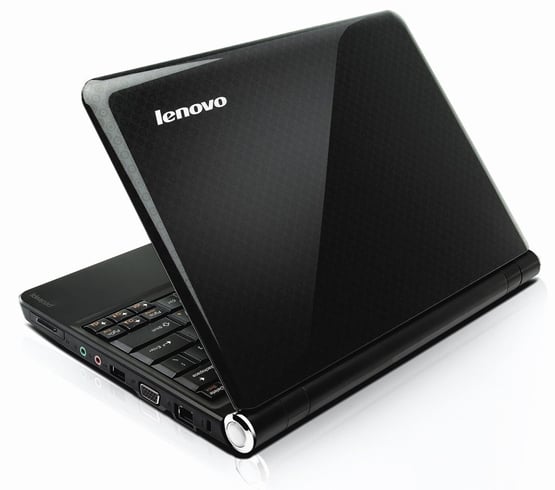
Lenovo Goes Ion With 12.1" IdeaPad S12 Netbook

It's shaping up to be quite the month for Lenovo. Just weeks after it unveiled a refreshed version of its IdeaPad S10 netbook (understandably deemed the S10-2), the company is dropping yet another new rig on the world. Today, the IdeaPad S12 came to light, bringing with it the title of world's first netbook with NVIDIA's Ion technology. How significant will this be in the netbook world? If we had to guess today, we'd say "very."


If you'll recall, NVIDIA's Ion is a new chipset that aims to provide 1080p capabilities to otherwise underpowered and low-cost machines. It's the same technology that launched in Acer's Aspire Revo nettop, and the same technology that recently shipped in a Zotac mainboard. Most netbooks today ship with lowly integrated graphics that can't handle multimedia at 720p or higher and cannot run any of the latest 3D gaming titles. Thus, most netbooks are stricken to handle only Office-type tasks and Web browsing.


Lenovo's IdeaPad S12 promises to be the first netbook that can seriously handle high-def tasks, with a 12.1" display and the ability to play back 1080p content (via the HDMI output, of course) in "silky smooth" fashion. As if that weren't enough, Lenovo also made sure to bless this machine with a 100% full size keyboard, something that's extraordinarily rare on netbooks. In fact, we'd say the tight, often misshaped keyboards are the worst attributes on netbooks. With this machine, it's just like typing on any standard 15.4" notebook. Nice touch, Lenovo.

The company hopes to begin shipping the S12 next month with prices starting at $449, though the Ion version (the flagship model) will cost $499. Still, for a netbook with a full size keyboard, Ion graphics and a six cell battery good for nearly six hours of life, that's not a lot to ask. Full specifications are below in the press release from Lenovo.


Specifications
  • Display: 12.1 WXGA (1280 X 800) LED 200 nit, 250g
  • Processor: Intel Atom N270
  • Graphics: Intel integrated GMA 950, Nvidia ION
  • Memory: Up to 1GB DDR2 533 MHz
  • Hard Drive: Up to 160 GB SATA (160, 250, 320)
  • Battery Life: 3 hours with 3-cell, 6 hours with 6-cell
  • Weight: 1.4kg with 3 cell, 1.55kg with 6 cell
  • Dimensions: 292 X 216 X 22-28.9mm
  • Connectivity: 10/100m Ethernet, Broadcom 578M, Intel WiFi Link 5150 1X2 AGN, Intel WiFi Link 5100 1X2 AGN, Non-Intel wireless b/g, Non-Intel wireless b/g/n, Bluetooth
  • Other: 3 USB, 1 Expresscard slot (Intel and VIA platforms), 4-in-1 card reader, VGA, RJA45, HDMI
  • Software: XP Home SP3 (32 bit)

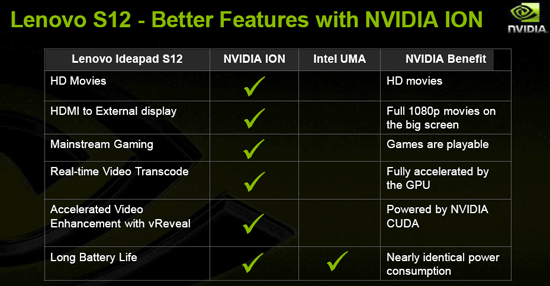
NVIDIA also took the opportunity to brief us on their proud new design win with Lenovo, underscoring the benefits of the platform over Intel chipset based solutions for the Atom processor.


And Lenovo's official press release came through over the wire this morning as well....


Lenovo Energizes Mini-Computing with its First 12-Inch Netbook Debuts World's First Netbook with NVIDIA's ION Graphics Processor

RESEARCH TRIANGLE PARK, NC – May 25, 2009: Lenovo today announced the IdeaPad S12, the company's first 12-inch netbook. The new netbook takes the best in connectivity, style and entertainment features in Lenovo's other netbooks and brings users the next level in netbook computing with improved usability and performance. These enhancements include a 12.1-inch screen, a 100 percent full-size keyboard and new graphics options with the NVIDIA ION™ platform.

"We've heard from consumers loud and clear about the need for affordable and extremely portable computing devices, and we've responded by introducing our third netbook with a completely new form factor, making mini-computing more usable and redefining value in today's market," said Dion Weisler, vice president, Business Operations, Idea Product Group, Lenovo. "We are pioneering new territory in the developing netbook arena by being the first vendor to give customers high quality video and entertainment capabilities in a netbook with optional NVIDIA ION graphics."

Elevating Power and Performance
Whether it's looking at photos, playing music, emailing or cruising online, consumers want smaller and more portable PCs. The Lenovo IdeaPad S12 netbook is raising the bar for higher levels of netbook computing with choices of the Intel Atom processor with Intel integrated graphics or the Intel Atom processor with NVIDIA ION graphics. Also, for the first time on a netbook with NVIDIA's ION graphics platform, users will be able to enjoy brilliant 1080p high definition video with silky smooth playback.
"NVIDIA ION graphics help deliver the same features found in premium PCs at lower price points and new form factors," said Rene Haas, general manager, Notebook GPUs, NVIDIA. "With enhanced graphics, the Lenovo IdeaPad S12 netbook is perfect for watching movies, playing popular games like Spore, flipping through vacation pictures or enhancing family videos."

The IdeaPad S12 netbook offers plenty of up and running time with up to six hours of battery life to support the mobile demands of netbook users1. Because netbook users need to stay connected wirelessly, the netbook comes with WiFi connectivity and ready for 3G with an ExpressCard slot to enable connectivity2. To hold the photos, music and videos users keep on their netbooks, the IdeaPad S12 netbook offers ample hard drive storage and memory with up to 160 GB of storage and 1 GB of memory. For peace of mind in case data becomes corrupted, Lenovo's OneKey™ Rescue System can help recover user data or device settings.

Loaded with Style and Entertainment
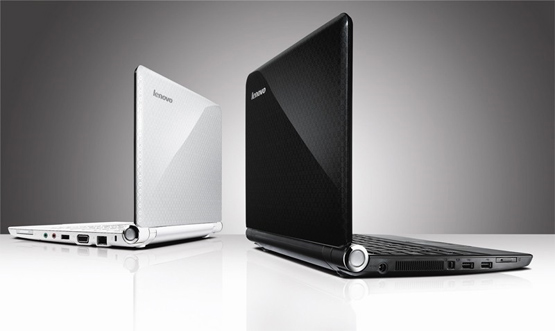
In addition to the netbook's sleek and sophisticated ring pattern design in black or white, users can make the netbook their one-stop entertainment device, starting from the moment they turn it on. Lenovo's expanded VeriFace facial recognition technology makes logging in a snap by recognizing the user's face. If users want "on demand" functionality, they can go into the Lenovo Quick Start environment and check email, browse the Internet and more without waiting for the full operating system to boot. They can also don any set of headphones and enjoy surround sound audio with Dolby Headphone technology. If opting to watch video on an external monitor, they can easily connect through the netbook's VGA port or HDMI port on select models. They can also choose among several multimedia formats to upload through the 4-in-1 multicard reader.

An Improved Computing Experience
Lenovo designed the IdeaPad S12 netbook for consumers looking for a super thin, portable and affordable device that offered a familiar, computing experience. Lenovo enlarged the netbook's WXGA screen from 10.1 inches to 12.1 inches for better viewing and made the keyboard 100 percent the size of a full-size laptop to make typing easier and less cramped. And when it comes to portability, by measuring less than an inch thick4, the netbook leads the industry for thinness compared to other 12-inch netbooks. The lightweight IdeaPad S12 netbook weighs in at just three pounds5.

Pricing and Availability
The IdeaPad S12 netbook will be available in June through business partners and www.lenovo.com. Pricing for models starts at $449. Models with the NVIDIA ION graphics will be available later this summer.


Friday, April 17, 2009

Netbook Evolution: 22 Netbooks in 18 Months

A look at the fast-changing netbook – with an overview of models released in the past 18 months.


Elias Plastiras, PC World Australia


Faster, Bigger, Prettier, Stronger, Pricier!

Click here for full-size image

ASUS is responsible for introducing the netbook to the PC market as an affordable and simple laptop solution for students. Since the release of the original Eee PC, almost every major PC vendor has released competing models — many taking alternate design paths moving the netbook concept in different directions away from the original Eee PC. As such, the netbook has evolved in ways many people probably weren’t expecting: they got bigger, more powerful, more expensive, and have even become luxury items! Furthermore, Windows XP has dominated over Linux as the installed operating system.


We take a look at the evolution of the netbook – with an overview of the netbooks we’ve tested in the last 18 months. We start with the humble, original Linux-based ASUS Eee PC 701, to the Vista-running HP 2133 Mini-Note, and the breathtaking MSI Wind U120.

ASUS Eee PC 701 4G

Click here for full-size image

It has been approximately 18 months since the release of the original Eee PC, which ran a modified Xandros version of Linux, had a 4GB solid state drive, a small 7in screen, 512MB of RAM and an Intel Celeron M CPU. It cost $363 at the time of its release, making it the cheapest laptop on the market.

ASUS Eee PC 900

Click here for full-size image

Next up was the Eee PC 900. With an 8.9in screen, it was bigger than the Eee PC 701 4G, but it also had more storage and RAM. It was available with either or operating system versions. The Linux version came with a larger solid state storage drive than the Windows version — making it more expensive than the Windows version ($472 compared to $436).

HP 2133 Mini-Note PC

Click here for full-size image

HP was the next vendor after ASUS to introduce a netbook to the market, and its 2133 Mini-Note PC differed as it was aimed at business users, not students. It had an 8.9in screen, a VIA C7-M CPU (1.6GHz), 2GB of RAM, a huge 160GB hard drive, and it was the first netbook to run Windows Vista Business edition. It also had an ExpressCard/54 slot, making it a desirable choice for users wanting to use a 3G data card. It also had a tendency to get very hot, making it uncomfortable to use on your lap for long periods, and its battery life was poor. It cost $499 at release.

A second version of the Mini-Note was released, priced at $899, which had a 1.2GHz CPU and 1GB of RAM.

ASUS Eee PC 701 4G (Lush Green)

Click here for full-size image

Before another manufacturer could move into the netbook market, ASUS revised the price of its original Linux-based Eee PC to $349 and made it available in a variety of colors — including Lush Green.

ASUS Eee PC 901

Click here for full-size image

And it didn’t stop with new colours — ASUS soon released the Eee PC 901. This was a sleeker design, but a slightly heavier model than the Eee PC 900, and was based on the Intel Atom N270 (1.6GHz) CPU. With its 6-cell battery, it provided over five hours of life away from a power outlet, making it THE netbook of choice for on-the-road usage. It had an 8.9in screen, 1GB of RAM, and was available with either Linux or Windows XP operating systems installed. The Linux version came with 20GB of solid state storage, while the Windows version came with a paltry 12GB. The Eee PC 901 also heralded the introduction of Gigabit Ethernet and 802.11n wireless networking in a netbook. It cost $472.

MSI Wind U100

Click here for full-size image

MSI was next to enter the netbook market, providing a breath of fresh air with its Wind U100 model. This model was white, had a 10in screen, an 80GB hard drive, 1GB RAM, ran Windows XP, and was based on Intel’s Atom N270 CPU (1.6GHz). Most importantly, it provided excellent battery life through its 6-cell battery. It was easy to use, making it one of our favourite netbooks, but it wasn’t without its flaws; mainly, it was a top-heavy unit, which means it easily fell over while in your lap. Its price was $509 at launch.

Pioneer DreamBook Light IL1

Click here for full-size image

Pioneer Computers was the first of the Australian PC builders to send us its version of the netbook, which didn’t compare favorably to what was on the market at the time. It looked and felt awful to use, but at $400, it was reasonably priced. It had a 7in screen, a 1GHz VIA C7-M CPU, 1GB of RAM, a 40GB hard drive, and was the first and only netbook we’ve seen with a 56Kbps modem. It ran Windows XP (slowly) and its poor screen resolution (a stretched 1024x768) as well as a cramped keyboard and touchpad made it uncomfortable to use.

Acer Aspire One

Click here for full-size image

The next well-known manufacturer to release a netbook was Acer, and its Linpus-based Aspire One became one of the most interesting models on the market. It had an 8GB solid state drive installed, but also included two SD memory card slots. One of those could be used to expand the internal storage of the unit by up to 12GB (although we only tested with a 4GB SD card at the time). It had an 8.9in screen, weighed only 900 grams, and despite being so small, was relatively easy to use. It cost $436 and only had 512MB of RAM, but there was also a Windows XP version available with 1.5GB of RAM and a 120GB hard drive for $509.

ASUS Eee PC 1000H

Click here for full-size image

Every time ASUS released a new Eee PC, it took the netbook market up one notch. The Eee PC 1000H was the first Eee PC that we reviewed that included a conventional, spinning hard drive. It generated more noise and heat than the previous Eee PC 901 and 900 models, but it also gave it a little more speed than those solid state drive-based models. The 1000H had a 10in screen, making it bigger and heavier than the Eee PC 901. It ran Windows XP (Linux was available, too), had an Intel Atom N270 CPU (1.6GHz), 1GB of RAM, and had 802.11n wireless networking. Basically, it was a little closer to a conventional notebook than a netbook — and it was glossy — but it only cost $509!

Dell Inspiron Mini 9

Click here for full-size image

Dell finally entered the market. The leading PC vendor was late to the netbook party and failed to enthral us with its modest offering. The Inspiron Mini 9 had an 8.9in screen, a solid state drive (16GB), an Intel Atom N270 CPU (1.6GHz), and 1GB of RAM. It got quite warm during regular usage, making it uncomfortable to use on your lap, but it was also difficult to type on. Despite its poor design, the Mini 9 was the unit of choice for mobile phone vendors. By integrating their 3G modules into its 3G slot mobile phone vendors offered it as part of their mobile broadband plans. If you didn’t get the Mini 9 on a mobile phone plan, it would have cost you $436.

Lenovo IdeaPad S10

Click here for full-size image

Although it was released in November 2008, Lenovo’s IdeaPad S10 netbook is back in the news as it is the laptop of choice for the Department of Education and Training’s notebook deployment for teachers and students. It’s a deal set to be worth $109 million and will roll out 267,000 units. But why was the Lenovo chosen over the ASUS, Acer and HP models? The Lenovo netbook has nice styling, runs Windows XP, has a 160GB hard drive, a 10in screen, and 1GB of RAM. Those specs are standard, but the interesting thing about the IdeaPad S10 is that it also has an ExpressCard/34 expansion slot. We were initially surprised that the Department of Education and Training didn’t choose a model with a solid state drive, which wouldn’t be as prone to damage when in the hands of students. And many other models offer a better battery life too. The IdeaPad S10 does offer increased drive capacity which may be of benefit when running memory intensive applications. Nonetheless, we really like the IdeaPadS10 and for $509, we rate this as one of the top five netbooks on the market.

Toshiba NB100

Click here for full-size image

The NB100 introduced a new feature into the netbook space — the sleep-and-charge USB port. This makes it an ideal netbook for travellers who want to quickly charge their MP3 player or phone while they are on the road (of course, the NB100 needs to be charged before it will charge other devices). It’s an 8.9in, Windows XP-based netbook with an Intel Atom N270 (1.6GHz) CPU, 1GB of RAM and a 120GB hard drive. For $520 (RRP at the time of review) it’s a little overpriced, but we rate it highly as it’s a convenient laptop to use while travelling.

Fujitsu M1010

Click here for full-size image

With ASUS, Lenovo and MSI moving towards larger screens on their netbook models, Fujitsu, like Toshiba and Dell, stayed at a small 8.9in screen. The M1010 is small, but feature-rich, as it includes an ExpressCard/34 slot. It’s based on an Intel Atom N270 CPU (1.6GHz), 1GB RAM, and has a 60GB hard drive. It costs $509 and is solidly constructed. It’s definitely one of our favorites. Its only drawbacks — the screen’s susceptible to reflection, and the touchpad is uncomfortable to use.

HP Mini 1001TU

Click here for full-size image

HP impressed us with its 2133 Mini-Note netbook, which was aimed at business users, but the Mini 1001TU is an underdone, overpriced netbook. The only new feature it brings to the netbook market is a bigger, 10.2in screen. Despite the increased screen size, the 1001TU is actually smaller than the 2133 Mini-Note, and it runs much cooler. It’s based on an Intel Atom N270 CPU (1.6GHz), 1GB of RAM, a 60GB hard drive and 802.11g wireless networking. That’s not enough to justify its $399 price tag.

Dell Inspiron Mini 12

Click here for full-size image

It’s bigger than the Inspiron Mini 9 and it has a keyboard that has all keys in natural positions, making the sturdily built Inspiron Mini 12 comfortable to use. It has a 10.2in screen, runs Windows XP and uses an Intel Atom Z530 (1.6GHz) CPU rather than an N270 model, has 1GB of RAM, and an 80GB hard drive. With only a 3-cell battery, the Mini 12 has poor battery life, and at $618 it’s an expensive unit considering you don’t even get 802.11n wireless networking. At this price point you’re basically paying for the bigger screen, which is worth it as it runs at 1280x800, a higher resolution than most netbooks on the market.

HP Vivienne Tam Special Edition Notebook PC

Click here for full-size image

Who would’ve thought the humble netbook would evolve from something a student would use in a classroom to something a style master can take into in a boardroom? This is basically the HP Mini 1001TU, but with a fancy paint scheme for the same $699 price tag.

Acer Aspire One AOD 150

Click here for full-size image

Acer’s second netbook is a 10.2in version that’s surprisingly small, yet comfortable to use once you get the hang of it. It doesn’t have remarkable specifications (1.6GHz Intel Atom CPU, 1GB RAM, 160GB hard drive, Windows XP), but it does have the best screen quality we’ve ever seen in a netbook. If you want a netbook that has a bright, vibrant screen for watching videos, this is the one to choose. However, its resolution could be higher (it’s only 1024x600), and for $581, it could use a better battery and faster wireless networking. Still, we love this netbook.

ASUS Eee PC S101H

Click here for full-size image

HP’s Vivienne Tam Special Edition Notebook PC notwithstanding, the Eee PC S101H best exemplifies what the netbook has become: a sought after tool that’s not only for students, but also style-conscious users who want something small and good-looking to undertake their basic computing tasks. In fact, the Eee PC S101H was launched at a catwalk event while models also flaunted Calvin Klein’s latest designer threads. At a price of $727 it’s definitely not for the student market.

HP Mini 2140

Click here for full-size image

At $499, this is the most expensive netbook on the market, but it’s also one of the most powerful. It’s the upgrade to the business-oriented 2133 Mini-Note, and features an Intel Atom CPU instead of a VIA C7-M CPU. It includes 2GB of RAM, a 160GB hard drive, the option to use Windows Vista Business (it also comes with Windows XP) and it has an ExpressCard/54 slot and 802.11n networking. The worst part about it is the 1024x576 resolution for its 10.2in screen.

Kogan Agora Netbook Pro

Click here for full-size image

Kogan’s Agora Netbook Pro hits the market with gOS, which is based on the Linux-based Ubuntu operating system. It’s a 10.2in model with an awesome price tag of $392. You get a 6-cell battery, a 1.6GHz Intel Atom CPU, 2GB of RAM, 802.11g wireless networking and a 160GB hard drive. There’s also a sub-$500 version available, which has 1GB of RAM and a 3-cell battery instead. They’re definitely great models to consider if you’re after lots of bang for your buck.

ASUS Eee PC 1000HE

Click here for full-size image

This model is basically a reprise of the Eee PC 1000H, but it provides a newer keyboard design and longer battery life. It has what ASUS calls the “Chiclet keyboard” providing wider gaps between the keys to improve key travel. For $654, the Eee PC 1000HE includes a 10in screen, 160GB hard drive, 1GB of RAM and an Intel Atom N270 1.6GHz CPU, but a faster Intel Atom N280 version is also offered.

MSI Wind U120

Click here for full-size image

MSI’s latest offering is one of the most comfortable to use netbooks on the market. But it still suffers from balance problems! We let that slide to an extent, as the Wind U120 has a great 10.2in screen and performs well. It costs $545 and is hard to pass up if you want a big and easy to use netbook. Go for the MSI Wind U123 if you want a netbook with built-in 3G.


Tuesday, March 10, 2009

Apple touch-screen netbook in Q3?


Boom: Apple netbook in Q3 -- that's the rumor being spread by the Commercial Times / DigiTimes tag-team of electronics tattlers. Apparently, Wintek will supply the touch-panels to Quanta computer who'll be tasked with assembling Apple's netbook. Take this one with a grain of salt though -- while these two Taiwan-based magazines tend to be accurate with insider info related to Taiwan-based companies like Acer and ASUS, they can often be wide of the mark with rumors related to foreign companies. Unless of course we missed the launch of the Blu-ray Xbox 360 and G5 PowerBooks.

[Image courtesy of Frunny]

Saturday, March 7, 2009

Eee PC-in-a-Keyboard Coming Soon

By Charlie Sorrel Email

Asuseeekeyboardpc

If you can fit a whole computer, keyboard and screen into a tiny, fold-up 7" box, why not squeeze one into a keyboard? And while you're there, what about adding a little touchscreen in the space normally inhabited by the number pad?

What's that? Asus did it already? By jove, it did! Look at that! The Eee PC Keyboard is a netbook stuffed inside a keyboard: 1.6GHz Atom processor, 1GB RAM and either an 8GB or a 16GB solid state drive for storage. The touch screen is a five-incher and can be used for navigation and display. Should you feel the need for something a little larger, you can hook the Eee up to a monitor via VGA and HDMI or, in the case of the more expensive model, the display can be connected wirelessly.

The Eees will be available in May, for $400 and $600. One more thing: Is it just us, or does everything come with an Eee brand on it these days? It's certainly helping out the alphabet's second vowel, although as the English language's most popular letter, it doesn't really need it.

Asus keyboard PC due May. Or maybe June [The Reg]