by Dan Frakes, Macworld.com
Among the third-party products demonstrated during June’s WWDC keynote, the one that may have generated the most anticipation was TomTom’s TomTom for iPhone. This combination of an iPhone app providing turn-by-turn driving directions and a hardware accessory, the Car Kit for iPhone, that enhances the app will enable the iPhone to take the place of a standalone GPS unit for many users. Unfortunately, TomTom CTO Peter-Frans Pauwels didn’t provide many details during that demonstration other than to say that TomTom for iPhone would be available “later this summer.” 26224338
Macworld recently had a chance to talk with with Tom Murray, Vice President of Market Development for TomTom, and while the company hasn’t yet announced a release date or final pricing information, Murray was able to expand on some of the information presented at WWDC. (You can see a video teaser of TomTom for iPhone on YouTube.)
iPhone challenges
While other vendors have announced, and in some cases already released, navigation apps for the iPhone (AT&T’s Navigator and Sygic’s Mobile Maps are a couple of the latter), Murray noted that TomTom for iPhone is unique because it’s a two-part solution. By combining software and hardware, the company says it can provide an experience that’s much more comparable to that of a standalone navigation unit than an app on its own.
According to Murray, the biggest challenge presented by an iPhone-based navigation solution is that dedicated navigation devices have better GPS reception than an unassisted iPhone. In addition, the iPhone doesn’t include any of the special technologies TomTom implements in its own navigation units; for example, gyroscopes and other hardware that allow a unit to better approximate its position when it loses the GPS signal in, say, a tunnel. The size of the iPhone is also an issue—4.3-inch screens are becoming the standard for standalone devices, while the iPhone’s screen is only 3.5 inches in size. And few iPhone owners have car mounts for positioning the phone safely while driving.
There are also logistical issues. For example, because the iPhone doesn’t support background processes, any navigation app must shut down during phone calls, making real-time tracking difficult—something that doesn’t happen on a dedicated GPS unit, even one that includes telephony features. And while the iPhone offers far more space for data storage than do most GPS units, the company recognizes that iPhone owners will want to use much of that space for apps and media, so navigation apps need to avoid abusing the opportunity.
Car Kit not required, but recommended
iPhone owners will be able to purchase and use the TomTom software and maps without the Car Kit hardware accessory; however, the Car Kit for iPhone was designed to enhance the software by addressing several of the limitations mentioned above. For starters, the Car Kit includes a separate GPS receiver that performs better than the one built into the iPhone; Murray said this receiver is closer to what you’d find in a dedicated GPS unit. The TomTom app uses this receiver when your iPhone is docked in the Car Kit, allowing for improved real-time navigation, especially in cities with large buildings or in locations with lots of trees or other natural obstacles. The Car Kit also includes a built-in speaker that provides better audio quality and considerably louder output, making it easier to hear spoken directions.
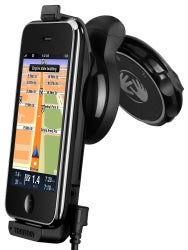
The Car Kit is also a car mount for placing your iPhone in a safe location for driving. The unit includes the same EasyPort mount as TomTom’s recent standalone GPS units, letting you adjust the cradle’s angle, rotation, and relative position (you can position the cradle sitting on or hanging from the mount). The mount locks in place when in use, and folds flat for easier storage. The Kit's power cable plugs into your car’s accessory jack or any USB power source and charges your iPhone while docked.
Finally, the Car Kit includes several additional audio features. For example, it includes a 1/8-inch audio-output jack for connecting the iPhone and Car Kit to any car stereo with an auxiliary-input jack; this lets you listen to both navigation directions and iPhone audio—including music—through your car stereo. You also get a microphone that lets you use the Car Kit as a Bluetooth speakerphone. (Yes, even though the iPhone physically connects to the Car Kit, it uses a Bluetooth connection for phone calls.)
We asked TomTom how the company will promote the TomTom for iPhone package, given that the software and hardware will necessarily be sold and distributed separately—the app through the App Store, the hardware through other outlets. The company says it intends to sell each separately, as well to bundle the two, but that making people aware of the hardware if they purchase the software first will be the biggest challenge.
TomTom features, iPhone UI
While the iPhone’s hardware can’t match that of a standalone GPS unit, Murray noted that TomTom is taking advantage of the iPhone’s own unique features to enhance the app. For example, unlike TomTom’s dedicated GPS devices, the TomTom app’s interface has portrait and landscape modes depending, of course, on how the phone is oriented. You can also use the iPhone’s multi-touch gestures—tap, swipe, pinch, and zoom—to navigate the interface and zoom in and out of maps. You’ll also be able to access your iPhone contacts from within the TomTom app, letting you quickly choose a destination or starting point from a contact’s information. (Integration with other apps has not yet been announced.)
Mapping and navigation will apparently work much as they do on the company’s standalone units, with a similar interface, most of the same core features, and similar voice-guided navigation. The app will include TomTom’s IQ Routes feature, which takes advantage of other TomTom GPS owners’ driving experiences to determine the actual speeds driven on particular routes at particular times of day. Murray said the “trillions of bits of data” lets IQ Routes provide accurate information about historical drive-speed norms, generating more accurate drive times and letting the software choose the actual fastest route, which may not be the same as the shortest route.
One feature Murray couldn’t yet confirm or deny is Map Share, which lets users make route corrections—for example, road closures or incorrect street information—on their devices and then sync those changes with TomTom’s servers to share them with other users.
(When asked which TomTom GPS unit the iPhone will most-closely compare with, Murray said there is none—the iPhone’s screen size makes it similar to the older, 3.5-inch-screen models, but features such as IQ Routes make its software more similar to that of newer models.)
Pricing and availability haven’t yet arrived
Unfortunately, TomTom wasn’t able to provide concrete information about pricing and availability—the company is still saying simply “later this summer.” However, Murray did tell us that the company is leaning towards a set price for the application and maps, rather than taking the subscription approach of AT&T. The application you purchase through the App Store will include the TomTom navigation software and the latest TeleAtlas maps for your area; North America and Europe will be the initial areas offered.
Due to the size of the maps, the download will be quite large for an iPhone app—close to 1GB. (TomTom doesn’t yet know if the download will be restricted to WiFi connections.) iPhone users will be able to update their maps, although the policy and process for updating—for example, via in-app purchasing, App Store updates, or using software similar to TomTom Home—has yet to be determined.
Those interested in more information on TomTom for iPhone can sign up for status updates at the TomTom site.






 .
.

 Posts
Posts

