Zazzle Shop

Screen printing
Showing posts with label 3d-tv. Show all posts

Wednesday, March 10, 2010

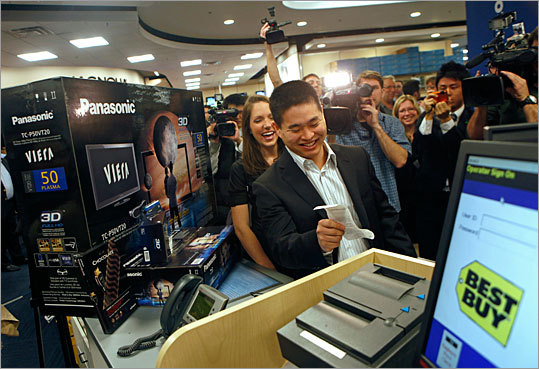
Panasonic's first 3-D TV set in $2,900 package

By http://www.boston.com/

Brad Katsuyama, holding a receipt, and wife Ashley, become the world's first consumers to purchase a Panasonic Full HD 3D system at Best Buy in New York on Wednesday March 10, 2010.
(David Goldman/AP Images for Best Buy)
Brad Katsuyama, holding a receipt, and wife Ashley, become the world's first consumers to purchase a Panasonic Full HD 3D system at Best Buy in New York on Wednesday March 10, 2010.

NEW YORK—Panasonic Corp. on Wednesday revealed the price for its first 3-D TV set, confirming that $3,000 is about what it takes to be among the first to watch 3-D movies in the home.

The Japanese company put its first 3-D sets on sale at an event in New York on Wednesday. Panasonic's suggested retail price is $2,900 for a 50-inch plasma set, one pair of glasses and a 3-D Blu-ray player. An extra pair of glasses costs $150.

South Korean competitor Samsung Electronics Co. announced Tuesday that its 3-D sets would go on sale this week. For $3,000, buyers get a 46-inch set, two pairs of glasses, a 3-D Blu-ray player and a 3-D copy of "Monsters vs. Aliens." There's also a 55-inch set available -- it's $3,300 for the set alone.

Both manufacturers plan to expand their 3-D lines rapidly. Rivals are on their heels: LG Electronics Inc. plans to put its 3-D sets on sale in May and Sony Corp. is bringing out its 3-D sets this summer.

The sets can switch between 3-D and regular 2-D mode, which doesn't require glasses.

There's a dearth of movies on 3-D discs, but studios are rushing to put them out. On Wednesday, Twentieth Century Fox, the studio arm of News Corp., said it would make "Ice Age: Dawn of the Dinosaurs" its debut title in 3-D Blu-ray.

Friday, March 5, 2010

ESPN's 3-D TV push will begin with college football - Andy Staples - SI.com

3D cameras like the one used to shoot the 2009 USC-Ohio State game feature two lenses, each of which stands in for a human eye.

Courtesy of ESPN/Jeff Mill
s
Read More here: ESPN's 3-D TV push will begin with college football - Andy Staples - SI.com

Friday, January 8, 2010

Toshiba Announces 3D HDTV with Video Conferencing and More

Toshiba KIRA2 HDTV and CELL Set-Top Box
Enlarge
Toshiba announces a 3D HDTV that packs an 8-core processor, video conferencing, 3D video, access to Vudu, Netflix, CinemaNow and more!
CES 2010 LAS VEGAS—Toshiba held a press conference on Wednesday morning to announce new HDTV's and Blu-ray players. The focus of the conference was to introduce the Toshiba KIRA2, a LED HDTV that will offer everything but the kitchen sink: video conferencing, 3D video, media sharing over a home network and access to popular internet sites and Video-On-Demand content such as Vudu, CinemaNow, Netflix and Facebook.
Toshiba’s Press Conference
The real magic of the KIRA2 is the box that is attached to it: it's a computer called the Cell Set-Top Box, incorporating the Cell microprocessor that Toshiba helped develop. The KIRA2 HDTV and Cell Set-Top Box will be sold together as the first in a new product line called the CELL TV Series.
The CELL Set-Top Box is powered by the CELL Broadband Engine, which Toshiba claims is 10 times faster than the average desktop computer. The platform includes 8 processors, each clocked at 3.2 GHz, which makes it output 200 GFLOPS (floating point operations per second.)
Toshiba KIRA2
Also inside the CELL Set-Top Box is a 1 TB hard drive, 802.11n Wi-Fi with support for DLNA and Wireless HD for connecting the set-top box to the KIRA2 HDTV without any A/V cables. With the incredible processing power of the CELL Broadband Engine, the KIRA2 will be able to offer the following features:
  • Real-time conversion of 2D video to 3D video: Anything can be watched in 3D.

  • Advanced upscaing of standard-definition video: The set can improve the quality of non-high-definition content and convert it to high-definition with minimal images noise and maximum clarity.

  • Convert any convent video to 480-Hz: The set will produce smoother motion by displaying any video at 480 scenes per second (480Hz)

  • Automatically Calibrate HDTV Image: The KIRA2's color sensor will detect the amount of light in the room as well as the color temperature of the light in the room and automatically adjust the set's brightness, contrast, gamma, sharpness and color saturations to provide the best image for the type of room it is in.

  • Video Conferencing: The HDTV will include a video camera, microphone and software to video chat over the internet with compatible video conferencing platforms. All video calls received will be treated to the Cell's upscaling techniques.

  • Access to Cell TV: This will be a collection of internet content including Netflix, Vudu, CinemaNow, Pandora and more.

  • Accessible on your home network: Computers can copy and/or retrieve any media stored on the CELL Set-Top Box.

Pricing and availability was not announced. Check back at PCMag.com for a full review, when we receive a unit in for testing. For more information on the KIRA2, CELL Set-Top Box and CELL TV, visit Toshiba.com.

Thursday, January 7, 2010

Will Sports Fans Watch Games on ESPN in 3-D?

By Sean Gregory


Ken Reid / Workbook Stock / Getty

Grab your glasses, plop down on your couch, and watch the soccer ball fly out of your screen: ESPN is going 3-D. On Tuesday the popular sports network announced that it is launching the first-ever 3-D television channel. (Discovery Communications, Sony and IMAX also outlined plans to launch a 24/7 3-D television network in 2011.) For the channel's first year, ESPN, which is owned by Disney, has pledged to show at least 85 sporting events in 3-D, starting with the South Africa–Mexico World Cup match on June 11. The network also plans to broadcast additional World Cup matches, the Summer X Games and college basketball and football games in 3-D. At this point, ESPN is committing to the network for one year. "As we surveyed the landscape of the marketplace over the past four or five months, it became apparent to us that there was going to be this virtual tsunami of 3-D television sets hitting the marketplace," says Sean Bratches, ESPN's executive president for sales and marketing, who has played a major role in the network's 3-D initiative. "There's probably no better genre than sports for 3-D." (See the top 10 TV series of 2009.)
Over the past few years, when you asked any tech geek who works in sports about the future, you'd hear a familiar refrain: 3-D, 3-D, 3-D. Now, it appears the extra dimension is finally here. Analysts expect a slew of 3-D-related products to be released at the Consumer Electronics Show, which starts Jan. 7. ESPN has already experimented with 3-D production — the network showed the September USC–Ohio State football game in 3-D in select movie theaters.
What will the network look like? ESPN 3-D will have its designated space on the dial. However, when a live 3-D event is not playing, which will be most of the time for now, the channel will be dark. You'll need to buy a 3-D-capable television set, get a set-top box from your cable or satellite provider and, yes, grab a pair of glasses. "There will be varying degrees of glasses," says Bratches. "You can buy glasses for 50 cents that look like you're sitting next to Jake and Elwood Blues, or you can buy a very high-end designer pair. They all do very different things." Be careful: certain glasses only work with certain 3-D sets, so grill the guy at Best Buy. (Watch a video about how 3-D movies are made.)
According to Bratches, the in-home 3-D experience will take you dangerously close to the action. "When we did the USC–Ohio State game, one of the most interesting things we saw was when they ran a play to the side of the field where the 3-D cameras were," he says. "The people in the front row [of the theater] literally stood up. They thought they were going to get hit." Sports broadcasts in 3-D will require additional cameras at different angles from those in the 2-D production. "The camera at the center court line, 47 rows up, looking at the basketball game going back and forth doesn't provide a lot of value," Bratches says. For basketball games, you'll want to see a 3-D camera behind the basket: Duck, here comes Kobe flying at me. ESPN even plans to use different announcers for the 3-D broadcasts, so that they can emphasize the unique angles.
Though ESPN is still Disney's cash cow, the 3-D channel will carry significant risks. In addition to added production costs, there's a more crucial issue facing ESPN: whether people are ready to fork over big bucks to upgrade their television sets, just for a few good games. Yes, consumers can expect more 3-D content to be rolled out over the next few months. But will there be enough to justify what could be a $4,000 purchase, in a sticky economy, by the time ESPN 3-D launches? Plus, will the consumers who have already dropped a few thousand bucks on an HD set in recent years be ready to upgrade again so soon? (See questions and answers about retirement.)
Bratches says he heard the same skeptical questions when ESPN first entered the HD game. "If you look back at the HD experience, we had a similar amount of content that we're offering now in 3-D," he says. "But viewers saw the future, bought into the vision and invested, and now the deployment of HD sets is significant. We feel very good about where we are." And come June, ESPN will show sports fans where they are going. Look out for the flying soccer balls

Monday, January 4, 2010

First 3D Television Channel to Launch in the U.S. in 2010

By: Barb Dybwad
From: http://mashable.com/


It certainly looks like 2010 is shaping up to be the year during which 3D finally moves from the realm of novelty into both mainstream film and TV. Satellite cable provider DirecTV has a new satellite in the air, and according to HD Guru, one of the 200 new HD stations to be broadcast from it includes the first U.S. HDTV channel in 3D.

There are still some technical hurdles to clear before you’re watching zany sitcom antics flying toward you, but the trend is clear. The satellite begins full operation in March, and existing DirecTV set-top boxes will simply need a firmware upgrade to support the 3D programming. Unfortunately, you’ll still need to pick up a 3D-capable HDTV to play it back, and that’s where the market lag will play a role in determining how fast 3D will penetrate.

Although 3D content has a long history stretching all the way back to 1922 — when the first public 3D movie was displayed — a number of optics and display challenges, as well as market realities, relegated 3D to a periodic novelty for decades. With the vast majority of the technical hurdles now solved and 3D displays making steady inroads at seminal trade shows like CES over the past couple of years, 2010 is poised to be 3D’s breakout year. The emergence of a string of blockbusters like Avatar, Alice in Wonderland and more rounds out 3D’s emergence — or re-emergence — on the big screen. Soon, consumers will come to expect the same experience in their home theater as well.

Sony, Samsung, Mitsubishi, LG and other manufacturers will be showing off 3D displays at CES 2010 next week. They’ll be hoping the stars will align properly to make 2010 3D’s breakout year, and DirectTV’s news is a timely piece of that puzzle. Are you excited about 3D’s inroads to the home, or is your pocketbook still weary from the last cycle of high definition upgrades?

Monday, December 14, 2009

HDI's 100-inch, laser-driven 3D HDTV gets $10k to $15k price tag

Thought Mitsubishi's LaserVue set was pricey? Hah. HDI, the California startup with dreams of producing a 100-inch 3D HDTV that's driven by lasers, has just released the first hint of a price range, and as predicted, it ain't cheap. The set -- which has already been deemed a favorite by The Woz -- has reportedly had its first batch manufactured over in China, and we're told that a smattering of 'em should be available by May. If all goes well, the HDTV should be in full-scale production mode by Christmas of next year, and we've learned that the whole thing will measure around 10-inches thick. Amazingly, it'll also go relatively easy on the power meter, but the $10,000 to $15,000 price estimate is bound to shock some. Of course, Panasonic's own 103-inch 3D HDTV is currently pegged at around $75,000, so when you think of it from that perspective, HDI's offering is a bona fide bargain. And totally worth liquidating your future kid's college fund for.

Friday, December 11, 2009

2010 World Cup to be Telecast in 3-D


Green Point Stadium, South Africa FIFA

While FIFA made the unfortunate call yesterday to pass on TV replay capability for the upcoming World Cup, there will still be new broadcast technology unveiled this summer in South Africa. According to FIFA, up to 25 games from the competition will be filmed using Sony 3-D technology. There are no specific plans for broadcasting the 3-D games live, but it remains a possibility. And a compilation of footage will be turned into a feature-length film after the World Cup.

The announcement is the highest-profile appearance yet in what's been a steady trend towards 3-D technology for sports. From the live rugby battle between England and Scotland, to the NBA all-star game we reported on last year, to the announcement from SkyTV in England that it will launch a dedicated 3-D channel, get used to wearing goofy glasses (though some versions of the tech, sadly, won't require spectacles).
How Sony's 3-D Broadcast Works: Sony

So let us get this right: with thousands of hooligans gathered in South Africa, FIFA might now have 3-D footage of the next Ireland/France-Thierry Henry-handball-controversy, but will only use it for its highlight reel? Brilliant.

Thursday, October 29, 2009

Ready or not, the latest 3D technology is coming home

Panasonic 3D camera
Now wait one second before you start on the whole "I'm not wearing any stupid looking glasses," because no matter what you say, there are more people paying extra to go 3D movies than ever and the reason is simple; it's because this isn't like the crappy 3D you saw during the Super Bowl last year -- or that our parents grew up with. No, the 3D that Sony, Panasonic, and others are promising next year is like nothing you've seen. We've come a long way since the old anaglyph red and blue glasses that come in cereal boxes, so before you knock the new technology before it's even out, click through and read about the technologies that might bring us a real 3D revolution.

3D, the basics


We have two eyes for a reason and while we've enjoyed stereo sound since-like-forever, stereoscopic images haven't quite arrived. At its core, 3D is as simple as using two cameras to capture the data that our eyes would, but it's the display part that's proven tricky. Ultimately, the technology has to find a way to present each eye with a different variation of an image, at that point our eyes and brain do the rest.

Circular polarized or active LCD shutter glasses

The one thing that hasn't changed about 3D is the need for glasses -- if you're holding out for 3D on a big screen without glasses, you're going to let this generation of 3D pass you by. The technology in the glasses varies by a lot and the main two types these days are circular polarized and active LCD shutter. Both serve the same purpose, to ensure each eye sees a different image, but in much different ways.

RealD 3D circular polarized glasses
Circular polarized glasses are easily the most common used in 3D cinema today. If you've been to a 3D presentation of a Pixar movie, or maybe to Disney World and used what look like cheap sunglasses, you've probably tried the technology. Without going into too much detail, each lens is set to filter out different light, so for example in a polarized system like RealD's, there can either be two projectors with different polarizing filters in front of each (pictured below) or a special ZScreen which can alternate the clockwise and counterclockwise polarization for each frame. In either case, the right and left frame alternate at about 144 times per second so that each of 24 frames per second of a movie is displayed 3 times per eye.

RealD ZScreen
RealD circular polarized filter in front of a projector

One of the problems with circular polarized 3D is that a special silver screen is required and some argue it can negatively affect the color accuracy. But what's worse is that most of us don't have a projector at home and so far only a few HDTVs like the ridiculously expensive JVC GD-463D10 LCD TV at $9,200 can pull off the same polarization trickery.

LCD shutter glasses

So in comes the LCD shutter glasses -- the technology itself has actually been around for some time, in fact there were eight Sega Master Systems games that worked with shutter glasses dating back to the 80's. But the technology was limited by the display technology of that era which could only show 480i at 30 frames per second, which worked out to about 15 FPS per eye in 3D -- so yeah, the flickering could make you sick.

Sega Master System Shutter glasses
Sega Master System shutter glasses

Basically the way shutter glasses work is each lens can be blacked out very very quickly to synchronize with a frame displayed on the HDTV. This way a different 1920 x 1080 progressive image can be shown to each eye.


Notice that the LCD shutter on the left is closed.

An IR emitter connected to the TV sends signals to the glasses to keep 'em in sync. In larger demos, multiple emitters are mounted throughout the venue to ensure all the glasses get the signal. This is obviously less than ideal for a large movie theater, but shouldn't be a problem at home.

Panasonic 3D IR emmiter
IR emitter used in Pansonic's 3D demo

The other reason shutter glasses make sense at home is because they don't limit the viewing angles of the display -- not to mention the glasses are more expensive and someone would likely steal them from a theater. But besides these advantages, proponents argue that the colors are more accurate, there's less ghosting and smearing, and it is argued that the contrast is greater between the left and right eyes. So, you add all these reasons together and the technology should provide the most realistic and reliable 3D technology ever unleashed on consumers -- at home or anywhere else.

It's not all good though, besides the cost of the glasses and the added emitter in the TV, some say that there is added flickering, and with the shutters closing in front of your eyes, the image is dimmed a bit. Both Sony and Panasonic claim these are no longer issues in thanks to the super fast refresh rates and brightness available on the latest HDTVs.


Short Panasonic promotional video about how its 3D technology works

Sony, Samsung, Mitsubishi and Panasonic

Yes, you read that right, all four of these tech giants are pushing the same home 3D display technology. While Samsung and Mitsubishi have been demoing its DLP HDTVs with shutter glasses for-like-ever, both Sony and Panasonic have been showing LCD and Plasma (respectively) HDTVs that can display 3D HD at CES, CEDIA and other shows. In fact Sony and Panasonic promise to release the first consumer 3D capable displays next year. That last part is an important one, so listen up: both will offer HDTVs next year that will work just like any other HDTV today, but will also work with 3D. So not only are the HDTVs going to be fully backwards compatible, but supposedly the new sets won't cost much more than a normal HDTV. In fact Panasonic believes that in the next few years most of its HDTVs will be 3D ready.

Panasonic 3D Blu-ray player and glasses
XpanD LCD shutter glasses and special 3D Blu-ray player used in Panasonic's 3D demo

But why can't my current HDTV do 3D?

We know what you're thinking, you just bought a new HDTV and you want to know why it can't handle 3D. Even if it was possible to add an IR emitter to keep the shutter glasses in sync, the experience at 30 FPS per eye wouldn't be as enjoyable. And just like when the first 1080p HDTVs hit the shelves without the ability to actually accept 1080p input, the current crop of 120hz HDTVs can't actually display 120 frames per second -- only show each frame of a 60 fps signal, twice.

3D sources

Of course, 3D-capable displays don't do much without 3D content, and the good news is that most of the infrastructure needed for 3D in the home is already here thanks to HD. With the new 1.4 spec, HDMI has been updated to accomdate 3D and the first source is almost guaranteed to be Blu-ray. In fact as we speak the BDA is working on standardizing the storage of 3D movies on a Blu-ray Disc. It actually isn't nearly as hard as it sounds, because what is essentially needed is to up the spec from 1080p at 30 FPS to 1080p at 120 FPS. In fact a 50GB Blu-ray Disc has more than ample capacity to handle a 3D HD movie thanks to the wonders of video compression where only the difference of each frame is stored. So 3D movies only require about 50 percent more space, and the one thing about the new 3D Blu-ray standard that has been determined, is that every 3D Blu-ray Disc will include a 2D version of the movie.

ESPN 3D camera
3D camera used to broadcast a College Football game on ESPN.

This part might surprise you, but there have already been 3D broadcasts of major sporting events. Using RealD's circular polarized technology, ESPN broadcasts 3D presentations of major sporting events to theaters around the country. The most recent was the USC vs Ohio State game on September 12th, but other events like the National Championship game last year, and the Olympics before it, were beamed to theaters in 3D. And let us tell you, if you haven't seen your favorite sport in 3D, you're really missing something. In fact we wouldn't be surprised if the real killer application for 3D in the home was sports. Sure movies will be the first to be delivered thanks to the slow evolution of broadcast technology, but we still have our hopes that ESPN 3D will be next. But while we wait for CableLabs and the SCTE to hammer out the details of a 3D delivery standard, satellite subscribers in the UK appear to be on track to get a 3D channel next year.

Sony 3D gaming demo
The other 3D content that is coming eventually is 3D gaming. Sony was showing 3D games at IFA this year and there have been a number of rumors that real 3D gaming is coming to the Xbox 360. The only thing we really know for sure at this point is that Avatar will be one of the first 3D games, although no word on what technology will be used.

But not everyone can see 3D

When we say that 3D isn't for everyone, we mean it. In fact it is estimated that 4 percent of us are actually physically incapable of seeing 3D no matter what the display technology. And even worse, according to the College of Optometrists in Vision Development, "Research has shown that up to 56 percent of those 18 to 38 years of age have one or more problems with binocular vision and therefore could have difficulty seeing 3D." So if you are one of these affected, it might be time to see an opthamologist and get screened for amblyopia. And if you happen to be blind in one eye you can still watch 3D, but it'll just look normal to you -- assuming of course you have the glasses on.

Where we go from here

One thing we weren't able to learn in our quest for 3D knowledge was how compatible these different technologies are. Essentially we assume that the functional compatibility between the two main 3D display technologies described above are like the differences between LCD and Plasma -- in other words, they both connect to the same HD set-top-box and Blu-ray player -- but until the BDA announces the final details of the 3D specification there isn't really any way to know for sure. But it seems that if Blu-ray was compatible with both circular polarized and LCD shutter glasses, then certainly whatever broadcast standard or game console announced down the road would also work with both.

Conclusion

Like it or not, 3D is coming and just like HD before it, there will be plenty of technology pundits predicting its demise. The problem right now is very few have had the chance to check out the technology and if you have been lucky enough to see it, it is hard to convey how cool it is to others. On top of this, 3D has a long road ahead because most people think they have seen it because they've tried the anaglyph glasses during a Super Bowl Commercial. The other big hurdle is the whole stupid looking glasses argument -- which doesn't make that much sense since you'll be wearing them in the privacy of your own home. Now we know that the same technology lovers who read Engadget would never hate on any new technology without experiencing it first hand, but tell your friends and family that something new is coming, and no it isn't like anything else they've seen.


Monday, March 30, 2009

How To Make Your Television Play Anything in 3D

It could be a while before studios release home versions of big pictures like Coraline and Monsters vs Aliens in 3D. But you don't need to wait. Provided that you have a 3D-capable HDTV, turning it into a 3D home theater that is capable of playing any off-the-shelf DVD in 3D is surprisingly easy. Here's how to make the conversion.


First things first, you need to find out if your TV is 3D-capable. Because it's still a fairly niche feature, TV manufacturers often don't state whether their sets come loaded with the capability. Still, a surprising number do. In fact, every single new DLP set is 3D-capable, and a fair number of new plasmas are. (Samsung is making a big push in this area.) If you're unsure about your set, call customer service or check the instruction manual.

Materials

—A 3D-capable TV. For the purpose of this story, we used the Samsung PN50A450 50-in plasma, which retails for $1200.
—The Samsung SSG1000 3D Accessory Kit, which includes one pair of 3D shutter glasses (to get other glasses, it will cost more), a 3D emitter, and all the software you need. It retails for $130.
—A PC (preferably one with an HDMI jack)
—Your favorite DVDs

How It Works

3D works by tricking our brains into thinking each eye is watching the same image from a slightly different angle. When you see a 3D movie in the theaters, the process is simple. Just plop on the cheap plastic glasses and try not to plow through the popcorn too quickly. But those glasses only work with special 3D-enabled projectors and movie screens. Your home TV doesn't have these filters and lenses, and so it needs to use a bit more technical trickery to enable each of your eyes to see a different image. To do this, it uses what are called shutter glasses. The TV's image is refreshed 120 times per second. These glasses have lenses that effectively split the image between each eye by "shuttering" open and closed 60 times per second—fast enough that you can't tell what's going on. This flickering is tuned so that each eye is open at alternating times, receiving completely different images from the same screen and resulting in the 3D effect.

DDD, the company that makes the software that converts the two-dimensional DVDs and media files into 3D live as they play, explains how this works on its website: "The technology analyzes the color, position and motion characteristics of objects in a sequence of video frames and uses depth estimation to render stereoscopic views. The approach is broadly applicable to any 3D display device including glasses-based and glasses-free systems."

What It's Like

It's a mixed experience.

I tested the program on about a dozen test subjects, and the response was pretty much the same across the board. For the first few minutes, jaws were dropped to the floor—people couldn't believe what they were seeing. Freaks and Geeks in 3D! My DVD of old Residents music videos in 3D. Whoah! ("Amazing!" "Wow!" "How the heck is that happening?")


But the initial excitement soon subsided, and my guinea pigs inevitably asked me to turn the 3D off. ("Can we just watch the movie regularly now?") Fact is, the experience is cool, and initially impressive, but it just isn't very enjoyable. At least not yet. The main problem is the lack of subtlety. The best digital 3D movies make deliberate and extensive use of the third dimension, either by throwing stuff at the audience's face, or by immersing it in the environment. The instant 2D-to-3D software doesn't do that. It just pops some things into the foreground.

Most of the 3D effect appeared to be coming from a few simple tricks. The program seemed to push the bottom of the screen into the foreground, and progressively slope the upper part of the image into the background. This is presumably done based on the belief that the bottom of the screen is more likely to contain the subject of the scene, but it had the effect of making you feel as if you were looking up at something from below—like a tall building or a Big Mac on a highway billboard. "The basic assumption is that whatever is on the bottom of the screen is in the front," says Douglas Hunter, vice president of licensing for DDD. "Yes, but that's just one of about 15 different things the software looks for in deciding the depth values for each object. It's also looking at things such as color, contrast, motion, and object structure."

While the TriDef experience pales next to the carefully calibrated shots of Coraline, the promise is there. The program came with a "3D Demo Reel" of specially made footage, and these videos looked absolutely spectacular. The 3D version of Google Earth was similarly impressive, as was a 3D-ified Command and Conquer. Producing decent 3D footage is an art, and it's not one that a simple PC program is able to replicate on the fly. At least not yet.

How to Set It Up

Emitter
Step 1: Plug in the Emitter.
In order for these shutter glasses to work, you need to use an emitter that tunes the glasses' rapid-fire shuttering with the image on the screen. This emitter, which comes with the glasses, needs to be plugged into the back of your TV. If you have a 3D-enabled TV, there will be a small jack in the back labeled "3D Sync Out." Plug the transmitter in and place it next to your TV, facing forward.

TriDef
Step 2. Install the enclosed software on your PC.
The shutter glasses also come packaged with a program called TriDef Media Player. Pop the disc in your computer and install it, then hook the PC up to your TV. The best way to do this is with an HDMI cable. With the Samsung TV we tested this out on, the 3D only worked if it was plugged into the "HDMI 2" jack, so read your TV's instruction manual to make sure you've plugged into the right input. Then go to the TV's menu and look for a setting called "3D Mode." Turn it on.

Glasses
Step 3. Turn on Your Glasses.
Now it's time to turn the glasses on. There is a small button on the bottom of the glasses. Press it. Note that the glasses stop working if they aren't facing toward the emitter, so make sure there is a clear line of sight between the two objects.

Settings
Step 4. Pop in a DVD and Adjust the Settings.
TriDef Media Player acts just like any media-playing program, only it gives you the option of playing your video files and DVDs in 3D. You should only play a saved file if it is very high quality—otherwise TriDef will automatically shrink it to an unwatchably small size. DVDs provide a better experience. To play a DVD, pop it in the PC's drive and press "F4."

The DVD will begin playing. On the bottom right of the window will be a big circular button labeled "3D." Click it to switch between 2D and 3D modes. Directly to the right of this button will be two setting bars that you can adjust. One changes how "deep" the 3D is, and the other adjusts how much of the picture is in the foreground. Cranking both of these settings up will result in a more intense 3D experience, but will also make the movie slightly nauseating. I found the best experience came from keeping both settings slightly under 50 percent.