Zazzle Shop

Screen printing
Showing posts with label Cable. Show all posts

Wednesday, October 26, 2011

AT&T U-verse cuts the coax, goes wireless in-home

From http://gigaom.com/
Pretty soon, new AT&T U-verse subscribers won’t have to go through the hassle of having their entire home re-wired with coaxial cable when they sign up for the pay TV service. Instead, all they’ll need is a residential gateway and a set of thin-client wireless receivers to deliver live and on-demand TV throughout the home.

Starting Oct. 31, U-verse customers can order the new wireless receiver, which can be placed anywhere throughout the home or even outside, as long as it’s within Wi-Fi range. By hooking up the wireless receiver, users will no longer have to connect the TV’s set-top box to a coax connection, meaning they have the flexibility to move TVs around the house or to switch out the wireless receiver to rooms that aren’t used as much.


TVs hooked up to the wireless receivers will get all the same features that are available through more traditional wired set-top boxes, such as access to on-demand titles and whole-home DVR functionality. Subscribers are also able to pause a piece of programming and pick up watching it in any other room in the house.

More importantly, the wireless receiver will reduce the need for AT&T technicians to run coaxial cable throughout subscriber homes. That means an easier set-up process for new subscribers, and could drastically reduce the time it takes to get users set up and ready. Existing customers can also request the new wireless receivers, which they can put around the house thanks to a self-install kit.
The news follows a trend of pay TV operators introducing more IP-enabled services and devices. Verizon and Comcast, for instance, have both announced plans to make their content available through the Microsoft Xbox game console, which AT&T subscribers can already use as a set-top box. Comcast and Time Warner Cable are also building TV apps for connected TVs. And any number of operators — including Comcast, Time Warner Cable, Cablevision, and others have rolled out iPad apps that let users stream live or on-demand videos.

While AT&T has always delivered IP-based TV services, these examples show how it and other service providers can use streaming video to deliver new user experiences to users. While today the wireless streams are being delivered exclusively to U-verse receivers, we can imagine AT&T building apps for connected devices that could alleviate the need for the device. In the meantime, however, AT&T’s new wireless receivers are available for a one-time fee of $49, plus a $7 per month receiver rental fee.

Thursday, August 11, 2011

Cablevision brings live cable TV to the iPhone and iPod touch


Cablevision subscribers can now watch cable TV on their iPhones or iPod touch devices, thanks to the cable-TV provider extending the functionality of its iPad app to all of Apple’s iOS devices. The new app allows Cablevision customers to access live-TV channels as well as thousands of VOD titles. It also acts as a remote control for Cablevision’s set-top boxes, allowing customers to change channels and other settings.

Cablevision first launched its iPad app in April. The new release extends its functionality to the iPhone and iPod touch, while also bringing remote control features to the iPad app. However, it doesn’t solve two key issues: Consumption of live and VOD TV is restricted to a subscriber’s home, making it impossible to view programming on the go. That may have been a minor issue for the iPad, since it could work well as a replacement for the bedroom or as a “TV” for kids. However, one has to wonder how many people will watch live television on the small iPhone screen while at home.

Another unresolved issue is that some cable programmers don’t like the idea of programming becoming available on mobile devices, in home or otherwise. Time Warner Cable, which has been offering similar functionality since March, initially got pressed by a number of channels to take its programming off its iPad app. It was eventually able to strike agreements with these programmers, but Cablevision wasn’t so lucky: MTV and Comedy Central owner Viacom sued the cable provider in June, arguing that it doesn’t have the necessary rights to bring its channels to the iPad.

Wednesday, January 13, 2010

Your Guide to Cutting the Cord to Cable TV

From time to time, I'll give an overview of one broad MediaShift topic, annotated with online resources and plenty of tips. The idea is to help you understand the topic, learn the jargon, and take action. I previously covered Twitter, citizen journalism, and alternative models for newspapers, among other topics. This week I look at cutting the cord to cable (or satellite) TV and watching TV content online.

Background

Anyone who gets cable TV or satellite in the U.S. has noticed a pronounced trend over the years: their monthly bill keeps going up. Sure, you can get lots of channels, plus HD channels and DVR functions, but those usually cost extra. According to research from Centris (PDF), the average digital cable bill was nearly $75 last year, and the average monthly satellite TV bill was $69.
What's causing those bills to skyrocket? A lack of competition among cable and satellite providers, and the rising costs of programming. The most recent programming dustup happened when News Corp. demanded carriage fees from Time Warner Cable, and settled before any channels were dropped. Time Warner is planning an upcoming rate hike. Like other traditional media, TV networks (both cable and broadcast) are being squeezed by lower advertising income, and think they can just keep raising the cable bills indefinitely.
Unfortunately for the cable TV industry, they've picked a bad time to raise their rates. Centris found in a separate report (PDF) that due to the economic meltdown, eight percent of U.S. households were likely to cancel their pay TV in the third quarter of '09, and nearly half of households contacted TV providers for discounts or cheaper packages.
Thanks to the rise of Netflix, Hulu and hardware like the Roku box and Apple TV, cutting the cord to cable TV doesn't mean cutting yourself off from your favorite shows and channels. While past experiments at bringing together the web and TV (such as WebTV) have failed, the recent recession has pushed people to pursue their own convergence projects that enable them to watch web content on their TV. Depending on various living room setups and viewing habits, making the changeover from cable to online TV can be complex and maddening. But you're sure to save a bundle of money.

Hardware and Services

The first thing to do when cutting the cord is list the shows you watch regularly, and your favorite TV channels. Next, do a little online research to find out whether those shows appear on the channel's streaming sites (such as NBC.com, CBS.com, etc.) or on Hulu or YouTube. Many shows on pay channels such as HBO don't appear until much later, and usually must be bought via a service such as iTunes.
In addition to what's available online, you might be surprised at the quality of over-the-air broadcast channels since the digital switch-over last year. Many newer TVs only require an antenna to get local broadcast channels, while older TVs need a converter box, which runs from $40 to $80. Plus, some of the programming includes HD content. To find out which digital channels you can get over the airwaves, input your location at the AntennaWeb site.
(Note: Broadcasters recently announced at CES that they would be offering "mobile DTV" so that people could pick up digital broadcast TV on laptops, smartphones and tablets.)
Below is a rundown of some of the more important elements to enjoying TV content via the web. You won't need to get all of them but you can mix and match those that will get you what you need. Most cable quitters find they can get about 95 percent of the TV content they used to watch on cable via the various services below.
Hardware
Roku
This is the box most cable quitters seem to like. It connects to your TV and your computer network, let's you watch Netflix streaming movies, and offers some free and pay options for additional content. It costs $79.99 for SD and $99.99 for an HD model.
AppleTV
It's basically a front-end device to iTunes, letting you download movies and music and play them through your TV. Problem: No TV tuner or DVR functionality.
Digital converter box
If you want to get the digital over-the-air stations in your area, you'll likely need an antenna for newer TVs or this box for older TVs. Cost: $40 to $80.
wdtv.jpg
WD TV
WD TV
This small box connects your TV to an external hard drive, letting you play movies, TV shows, photos or music you have downloaded. The standard WD TV is about $79, while the WD TV Live that lets you watch Net content is $119.
eyeTV hybrid
It's a TV tuner for a Mac, letting you watch digital over-the-air channels on your Mac, or even on your iPhone with an extra $4.99 app. Cost: $149.95.
Game consoles
Netflix will let you play movies through your XBox 360 or PlayStation 3. There are also a wide variety of TV tuners and other devices that can turn game consoles into home entertainment systems.
Note: If you prefer simply connecting your computer directly to your TV set without any other hardware, you can do that, too. Here's a great video explaining how:
Services and Sites
Netflix
The granddaddy of the DVD-by-mail services, Netflix has also become a huge entryway for people who want to dump cable and get TV shows later when they're available on DVD. Netflix also offers unlimited streaming of some movies and TV shows, which works well with a Roku box or other Netflix-ready devices. Cost: $8.99/month for 1 DVD plus unlimited streaming, with various higher cost plans for more DVDs.
Hulu
The free U.S.-only TV show service is a joint venture between NBC Universal, Fox, and Disney. You are forced to watch commercials before and during TV shows and movies. While it has been an especially popular service for those dumping cable, there has been chatter that Hulu might charge for content at some point. Cost: Free (for now).
iTunes
Apple's poorly named digital media buying service started out selling music downloads. Then it added a podcast directory, and now sells TV shows and rents/sells movies. Downloading TV shows at $1.99 per episode can get pricey, though there are discounted "Season Passes" and some limited free TV show offers.
YouTube
The most popular video site on the web also can be accessed through various devices in order to view its content on your TV. These devices include the Nintendo Wii, PlayStation 3 and TiVo.
amazon on demand.jpg
Amazon on Demand
Amazon on Demand
Trying to compete with Netflix and iTunes, Amazon offers quick downloads of various TV shows at similar prices to iTunes. They are playable on Macs or PCs, or on devices that connect your computer to your TV.
Boxee
Free software that helps you organize TV and movie content on your computer. Currently in beta, the Boxee software will soon come on a special Boxee Box from D-Link for under $200.
PlayOn
Windows software that lets you play Netflix, Hulu, YouTube, etc. from your computer on your TV via a PlayStation 3, Wii or XBox 360. Cost: $39.99 after 14-day free trial.
BitTorrent
Popular free file-sharing software for people who trade TV show and movie files. You'll need to search your own conscience to decide whether to download copyrighted material from sites that utilize the torrent system.

Sample Setups

Here are a few sample setups of people who get TV content without subscribing to cable.
Roku + Netflix and Amazon
Who: CancelCable.com bloggers
Setup: Roku box that plays Netflix and Amazon content; digital TV converter box.
Quote: "Since we need to be more proactive and select shows from Netflix or Hulu, we read a lot more reviews and tend to sit down and watch complete movies rather than just switching around hundreds of channels."
eyetv setup.JPG
Dan Milbrath's setup with eyeTV
eyeTV + Mac Mini
Who: Dan Milbrath, product manager, San Francisco
Setup: eyeTV hybrid to get broadcast channels on a Mac Mini; projector for movies; Netflix.
Quote: "I'm intrigued by on-demand, online TV options like those being offered by Amazon and iTunes but I think the pricing is still a bit too steep. $1.99 for a one hour episode of 'Mad Men' is about double what I think they should charge."
AppleTV + PlayStation 3
Who: Leo Prieto, founder of online community Betazeta.com, Santiago, Chile
Setup: AppleTV with iTunes and Boxee; PlayStation 3 playing BitTorrent content, podcasts.
Quote: "I spend less than $30 a month on content, and it's all stuff I decided to watch (and not just 'what was on' or 'what I remembered to record on my DVR'). I also have Boxee on the Apple TV installed, which lets me access lots of public and free podcasts or web shows that aren't available on Apple TV (all free and legal)."
Hulu + laptop
Who: Carla King, author and tech editor, Pt. Richmond, Calif.
Setup: Laptop watching Hulu; uses projector for some movies on Netflix or iTunes.
Quote: "The availability of content of all kinds on the Internet is a terrible distraction for me from tasks at hand and health in general. Whereas before I could cancel my magazine subscriptions and choose not to buy cable TV to keep myself on task with personal and professional goals, I find that today I need to develop my willpower to the utmost."

What's Missing

For many people, the biggest barrier to canceling cable is the loss of live sports. While MLB.com has a package of games you can stream online, and CBS has offered a popular March Madness on Demand stream, many other leagues have been slow on the uptake. Plus, there are often restrictions and blackouts with some online season pass deals. For example, the NBA League Pass Broadband does not include nationally or locally televised games. So if you're living in Boston, you won't be able to see Celtics games online if they are also on TV at the same time (whether they are home or away).
Leo Prieto.jpg
Leo Prieto
The same goes for other live events, such as awards shows. "Mainly, live TV content is impossible," said Leo Prieto, who gave up cable in 2005. "And most of that live TV content isn't available to download on iTunes later. For example, the Oscars or some sports event. In that case I have to go to BitTorrent and get the show afterwards. I would love iTunes or YouTube to offer live content."
Multimedia reporter Sean Mussenden is also living the cable-free life, and says he believes TVs will eventually come with direct Internet capabilities. He had an interesting take on how his discovery of programs changed without cable.
"When you rely on cable, the easy access to thousands of shows tends to limit your willingness to explore further," he said. "But there are far more options for informative and/or entertaining content beyond cable. Not having having cable has made me more willing to explore. For example, at the moment I'm really enjoying watching talks on Ted.com and MIT's OpenCourseWare. I don't think I'd have discovered either of them if I still had cable."
In many cases, people who have canceled cable still get to see their favorite TV shows, but often much later than those with cable. If they can deal with being a bit behind, and don't mind the tech hassle of setting up a Net-to-TV connection with gear, they're often happy to save money and watch what they want.

More Reading

If you want to read more about cutting the cable TV cord, check out these sites and stories:
CancelCable.com
Cable Freedom Is a Click Away at NY Times
You Don't Need Satellite TV When Times Get Tough at News.com
Cancel Cable and Save with Free Internet TV at Digital Trends
Ways To Watch TV Without Paying An Arm And A Leg For Cable Or Satellite at Bible Money Matters
Turn On, Tune Out, Click Here at WSJ (paid subscription required)
Cancel Cable TV by Paul Kedrosky
Cable TV's Big Worry: Taming the Web at NY Times
Who Will Win the Cable Wars? Not You. at Slate
Broadcast TV Networks Want Your Money at The Atlantic
More Fees For Broadcasters Could Hurt Cable Networks' Growth at Dow Jones
Why the Roku Netflix Player Is the First Shot of the Revolution at NY Times
Netflix Agrees To Warner's New Release Delay In Exchange For More Streaming Rights at PaidContent
*****
Have I missed any important elements to cutting the cord? Have you cut the cord and if so, what's your setup? Share your thoughts in the comments below, and I'll update my story with any gear or services I missed.
UPDATE: There has been a lot of commentary on this story when it was linked on the PBS Facebook page. I thought it was worth addressing a few of those comments here:
> Michael Lindemann said, "Interesting that no one mentions cable Internet access as being an upshot to cable access. Interesting article, but it misses at least one key point: The fastest and most reliable way to get home Internet access is through the cable company! In my area, the cable Internet subscription is bundled with the cable service at a discount." That's true. For many people who cut the cord to cable TV, they still are likely to end up paying for Internet service from the cable company.
> Prashant Shah said, "The missing option in the article is the public library, where I've always found not-so-recent shows. Newer shows you need to wait a bit, but then I'm in no hurry." True enough. The public library in many communities offers up free borrowing of TV shows and movies on DVD. The selection can vary from library to library, but the price is right: free, as long as you return them on time.

Mark Glaser is executive editor of MediaShift and Idea Lab. He also writes the bi-weekly OPA Intelligence Report email newsletter for the Online Publishers Association. He lives in San Francisco with his son Julian. You can follow him on Twitter @mediatwit.


Wednesday, September 16, 2009

CableCARD Now Open To All, No Need For OEM Installations

For HTPC owners, most thought this day would never come. It's a liberation celebration, and frankly, it's coming way too late. Still, we'll take late over never almost all of the time, so we can't help but thank those involved for finally freeing CableCARDs of the OEM chains. This past week at CEDIA, Microsoft announced that anyone could now purchase an off-the-shelf CableCARD and install it into their system. This has absolutely not been the case in years past.


Up until now, users have had to purchase an entirely new system from a certified OEM (think Dell, HP, etc.) with a CableCARD installed at the factory. If you even attempted to install a loose CableCARD into your own machine, you'd never get anything to work. Without that OEM touch, CableCARDs were worthless. Obviously, this ensured that only the affluent ponied up for a CableCARD-equipped HTPC. After all, who wants to buy an entirely new rig just to use one $100 part?

As Windows 7 enters the fray, users will be able to add CableCARDs to their own systems with little to no hassle. These cards will allow users to access all of their carrier's cable channels right on their HTPC, eliminating the need for a cable box and a media center PC. Switched Digital Video support was also added into Windows Media Center for Windows 7, which definitely comes in handy for those looking to tune into SDV channels.


Switched Digital Video (SDV) Support Added for Windows Media Center

In response to customer requests and cable providers' deployment of SDV, Microsoft now supports SDV in Windows Media Center for Windows 7. In conjunction with a device known as a tuning adapter, supplied by a customer's cable provider, Windows Media Center and a digital cable tuner with CableCARD will be able to tune to SDV channels. Customers can enjoy SDV broadcasts on PCs running Windows Media Center in Windows 7 and a digital cable tuner with CableCARD.

End Customers Can Now Add Digital Cable Tuners With CableCARD to Their PCs

Microsoft and CableLabs announced that customers will now be able to add digital cable tuners with CableCARD to a Windows 7-based PC with Windows Media Center. A new tool will be provided by Microsoft that assesses the PC's ability to support the solution. This tool will analyze the customer's PC and enable digital cable support if the PC meets requirements, opening digital cable options to Windows Media Center customers across the country. Microsoft also announced that, with Windows 7, it has increased the number of TV tuners that can be connected to the PC from two to four per tuner type, thereby allowing customers to simultaneously record or watch as many as four digital cable TV channels.

"We are excited that digital cable customers will now be able to take advantage of this new opportunity to bring great cable TV programming to the PC," said So Vang, vice president of OpenCable at CableLabs. "We are dedicated to helping customers get the most from their cable service, and this will be a great win for both the customer and the cable operators."

Digital Cable Customers Can Now Enjoy More TV Portability in Windows Media Center

Microsoft and CableLabs also announced that they worked together to enable digital cable tuner with CableCARD customers to enjoy more portability for digital cable TV that is marked as "copy freely" (CF). Customers will be able to play CF-marked digital cable recordings, such as those from local channels, on other PCs, devices and portable media.

Windows Media Center Features in Windows 7 Highlighted

Using new Windows 7 features such as Windows Touch, HomeGroup, Remote Media Streaming and PlayTo, sharing recorded TV, videos, music and pictures throughout the home, while on the road and to remote locations has never been easier. There is also support for the AVCHD format. This allows customers to view HD video from many popular HD video cameras.

In addition, support for the international broadcast TV standards that was released with the Windows Media Center TV Pack 2008 will also be included in Windows Media Center in Windows 7. This includes native support for both ATSC and QAM, the ability to remap channels, and support for subchannels.

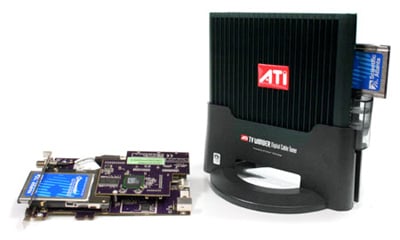
New Firmware for ATI TV Wonder Digital Cable Tuners

In conjunction with the Microsoft and CableLabs announcements, Advanced Micro Devices Inc. (AMD) will be providing a new firmware update that is available to all ATI TV Wonder digital cable tuners being used with Windows 7 and Windows Vista. This firmware update will allow existing digital cable tuner with CableCARD customers to enjoy more portability for digital cable TV marked as CF. Customers will be able to play CF-marked digital cable recordings, such as those from local channels, on other PCs, devices, and portable media. In addition, the firmware will contain support for SDV. When installed on a Windows 7-based PC with a digital cable tuner with CableCARD and a tuning adapter from a cable provider, it enables access to switched digital channels in locations where SDV has been deployed.

Monday, June 1, 2009

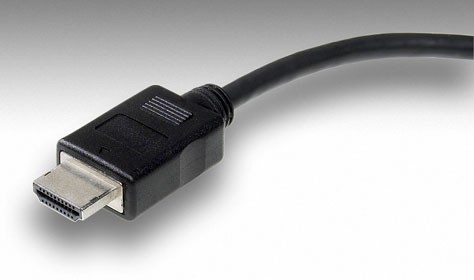
HDMI 1.4 Brings Ethernet, 3D, 4K Support To A/V

Remember the days when we weren't even sure if Sony's PlayStation 3 would rely on HDMI to output its high-definition content? Seems like an eternity ago, right? Today, HDMI is a home theater mainstay, and a practical guarantee on any piece of new A/V equipment. We're even seeing it pop up on lower-end notebooks these days, which certainly goes to show just how pervasive the format has become.

This week, the HDMI Licensing group announced the next logical step in the protocol, with HDMI 1.4 being revealed. Obviously, this takes over where HDMI 1.3 (the existing specification) left off, and we definitely have mixed feeling on the whole thing. For starters, we're thrilled to see such advancements delivered to HDMI. This new spec promises networking capabilities with Ethernet connectivity, not to mention an Audio Return Channel to enable upstream audio connections via the HDMI cable. Furthermore, it will support 3D over HDMI and 4K x 2K resolution. Finally, it'll support an array of expanded colors and even a microHDMI connector that is approximately 50% smaller than the size of the existing HDMI Mini Connector.


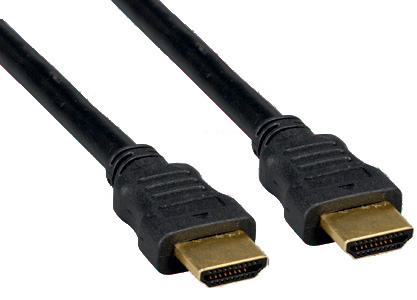
HDMI 1.4 is even tailored to automobiles...if you buy the right cable. You see, for as many things as HDMI 1.4 does right, it gets one thing very wrong. Consumers don't need any more confusion in their lives, especially when it comes to A/V. Instead of having just one cable that does it all (like HDMI 1.3), HDMI 1.4 will arrive in five different versions for varying needs. We appreciate the chance to choose, but in this industry, we can't see this going over well with unseasoned cable buyers.

The specification should be fully available to cable makers and equipment designers by the end of June, and while there's no time line given as to when we'll see HDMI 1.4 certified cords, we'd guess they'll be infiltrating Best Buy within the year. More details on the new features and five cable options are below.


The HDMI 1.4 specification will offer the following enhanced functionalities:

  • HDMI Ethernet Channel

The HDMI 1.4 specification will add a data channel to the HDMI cable and will enable high-speed bi-directional communication. Connected devices that include this feature will be able to send and receive data via 100 Mb/sec Ethernet, making them instantly ready for any IP-based application.

The HDMI Ethernet Channel will allow an Internet-enabled HDMI device to share its Internet connection with other HDMI devices without the need for a separate Ethernet cable. The new feature will also provide the connection platform to allow HDMI-enabled devices to share content between devices.

  • Audio Return Channel

The new specification will add an Audio Return Channel that will reduce the number of cables required to deliver audio upstream for processing and playback. In cases where HDTVs are directly receiving audio and video content, this new Audio Return Channel allows the HDTV to send the audio stream to the A/V receiver over the HDMI cable, eliminating the need for an extra cable.

  • 3D Over HDMI

The 1.4 version of the specification will define common 3D formats and resolutions for HDMI-enabled devices. The specification will standardize the input/output portion of the home 3D system and will specify up to dual-stream 1080p resolution.

  • 4K x 2K Resolution Support

The new specification will enable HDMI devices to support high-definition (HD) resolutions four times beyond the resolution of 1080p. Support for 4K x 2K will allow the HDMI interface to transmit content at the same resolution as many digital theaters. Formats supported include:

  • 3840x2160 24Hz/25Hz/30Hz
  • 4096x2160 24Hz
  • Expanded Support For Color Spaces

HDMI technology now supports color spaces designed specifically for digital still cameras. By supporting sYCC601, Adobe RGB and AdobeYCC601, HDMI-enabled display devices will be capable of reproducing more accurate life-like colors when connected to a digital still camera.

  • Micro HDMI Connector

The Micro HDMI Connector is a significantly smaller 19-pin connector that supports up to 1080p resolutions for portable devices. This new connector is approximately 50% smaller than the size of the existing HDMI Mini Connector.

  • Automotive Connection System

The Automotive Connection System is a cabling specification designed to be used as the basis for in-vehicle HD content distribution. The HDMI 1.4 specification will provide a solution designed to meet the rigors and environmental issues commonly found in automobiles, such as heat, vibration and noise. Using the Automotive Connection System, automobile manufactures will now have a viable solution for distributing HD content within the car.

Consumers will have a choice of the following HDMI cables:

  • Standard HDMI Cable – supports data rates up to 1080i/60;
  • High Speed HDMI Cable – supports data rates beyond 1080p, including Deep Color and all 3D formats of the new 1.4 specification;
  • Standard HDMI Cable with Ethernet – includes Ethernet connectivity;
  • High Speed HDMI Cable with Ethernet – includes Ethernet connectivity;
  • Automotive HDMI Cable – allows the connection of external HDMI-enabled devices to an in-vehicle HDMI device.

Tuesday, May 19, 2009

Cut your cable!

After canceling my cable TV subscription, I realized that online TV is much better
Mike Elgan

May 16, 2009 (Computerworld) As part of my transition to semi-nomadic living and gadget-consolidation project, I canceled my subscription to cable TV and returned the cable box and remote.

I assumed tradeoffs in this arrangement: I would end up with an inferior TV experience, but save money. What I discovered, however, is that the overall experience is actually better. Much better.

My TV, which I've had for a couple years, is a 42-inch Sony Bravia. My laptop (and now my one and only PC) is also a Sony: A Sony Vaio AW that has an HDMI port. To watch online TV on my big-screen TV, I simply plug the laptop into the TV with HDMI (The Vaio even comes with a remote). Other cabling options are almost as good.

Finding a show is easy: Just Google it. All major shows that I'm aware of have a link to the streaming or downloadable HD version on the first results page. You can also find clips and shows on social bookmarking sites, TV sites like Hulu, and on YouTube.

The picture and sound quality is amazing. It's not quite as good as HD programming via cable, but far better quality than analog TV or even DVDs. That surprised me. But a long list of other benefits surprised me even more.

Cable TV creates a minor anxiety. If you don't record shows, you feel the need to essentially keep an appointment each week to catch updates of whatever shows you're following. If you record them using TiVo or something similar, you feel pressed to hurry up and watch recorded shows before your available storage maxes out.

When relying exclusively on shows online, however, I don't have to think about TV schedules or DVR storage space. I can watch whatever I want whenever I want, or I can just stop watching TV for any amount of time. The missed episodes are always online when I want them.

Location independence: Of course, you can always watch your regular TV shows on a laptop. But by carrying cables while traveling, you can plug in to whatever big-screen TV is available. That laptop becomes a portable cable box. Time savings: Many shows, such as Saturday Night Live, TV news programs, the Colbert Report and others tend to be a mixed bag containing a lot of time-wasting junk, but also nuggets of entertainment gold.

We have been acclimated over the years to suffer through entire shows, essentially fishing for something funny or interesting. But TV is presented online often in the form of individual clips. One of the best sites is Hulu, which offers shows both in full format and in clip form. The clips are sortable by "Popular Clips" and "Featured Videos." The site does a great job of separating the junk from the gold. You can watch only the good bits and save a lot of time.

Watch in "epic-sode" form: In the same way that you can reduce shows into their component parts, you can also combine episodes into "epic-sodes" - multiple episodes viewed as one. By doing this, you can watch shows a season at a time.

Rather than watching one episode each of four shows per week, you can find shows online where the season is completed and watch consecutive episodes of only that one show (15 minutes per night, one hour per night, two hours per night - whatever you like) until the season is done. Then you move to another show. This is a great way to watch shows like "Lost," where every episode references previous ones.

Fewer commercials: Online HDTV shows often have commercials, but about a quarter of the commercials you'll find on regular TV.

Money savings: Obviously, not paying for cable saves money. In my case, the elimination of my landline phone and cable bundle saved me about $110 per month. (If I put all that money in the bank for 10 years, I'll be able to pay cash for a brand-new car.)

Browseability: Amazon Kindle users will tell you that they both read more and read more widely with a Kindle because books are easier to discover and browse. The same goes for online TV. It's much easier to find and browse for shows online and to try them out.

Two weeks ago I thought canceling my cable subscription was a good idea for digital nomads. But now I'm convinced it's a better way to go for everybody. It changes the way you think about and watch TV, and improves the whole experience.

If you don't believe me, then I challenge you to try it out. Before you cancel your cable, go cold turkey for one week without using the cable service, getting all your TV online and watching it on your regular TV. Let me know how it goes!

Mike Elgan writes about technology and global tech culture. He blogs about the technology needs, desires and successes of mobile warriors in his Computerworld blog, The World Is My Office. Contact Mike at mike.elgan@elgan.com, follow him on Twitter or his blog, The Raw Feed.