Zazzle Shop

Screen printing
Showing posts with label Browsers. Show all posts

Thursday, April 14, 2011

360 Web Browser: Not your grandfather's Netscape Navigator

by James Mowery


from http://www.techi.com/

The Web browser has been a standard feature included with operating systems for years. Most of them look and act in a similar fashion, with the core behaviors being relatively similar. But the devices have changed, and now the browser is changing along with it. The 360 Web Browser is leading that change.
Digital Poke’s tagline is “proving crazy concepts.” Well, 360 Web Browser truly is a crazy concept, but not only is it crazy, it is also amazing as well. It takes everything you know and love about the standard Web browsing experience and modernizes it for touch-based interfaces.


Comparing it to Apple’s Safari browser on the iPad and iPhone is tricky. With Safari, you get a relatively basic experience — it’ll get you going and where you want to be, sure, but for those who want more control and options to tinker with, Safari isn’t the answer.
This is where 360 Web Browser steps in. It is the battle axe to Safari’s arrow — it is an in-your-face browsing experience that might prove overwhelming for some, but for those who appreciate it, it will quickly become an essential tool for a browsing experience that can’t be had elsewhere.

360 Web Browser

With Safari, you press a few buttons, hit a back button, pull up a menu or two, and there you go; it’s a straightforward interaction. But with 360 Web Broeser, everything comes full circle — the user takes advantage of touch-based gestures to perform browser-specific actions that make a lot of sense for finger-to-glass interactions.
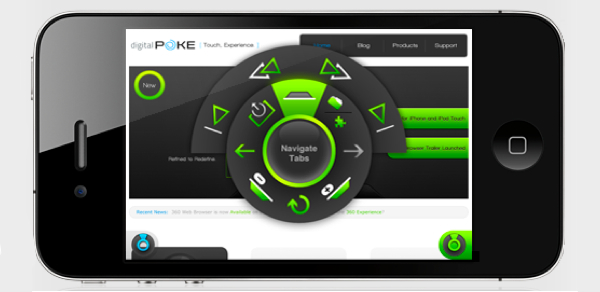
This is where 360 Web Browser’s navigation wheel comes into play (Digital Poke calls it the “arc”). The “arc” is a wheel-like interface that can be accessed by pressing a single button while browsing the Web. Once enabled, all the user needs to do is to drag their finger to the option that they want to perform. Several dozen actions are accessible this way, and it performs like one would expect. Creating new tabs, enlarging text, accessing bookmarks, and many other features are all done from this single UI interaction, with multiple levels of the “arc” allowing for more complex interactions. (Check out the video below for a better understanding.)

The “arc” interface performs even more admirably when you put the browser into full-screen mode. This removes all potential distractions, maximizes screen real estate, and still provides quick access to commonly used browser functions. It is an experience that I wish Apple had included by default with their own Safari browser.
But while the “arc” tends to be 360 Web Browser’s most noteworthy feature, there are a number of other interesting features that make 360 Web Browser worthwhile:
  • Firefox Sync, for syncing your 360 Web Browser’s bookmarks, tabs, and browsing history to Firefox;
  • Intelligent Tabbing, which offers desktop-style tab features that include individual settings and privacy settings, along with other general tabbed features;
  • powerful download manager that enables users to download any type of file;
  • built-in media player for listening to tunes while browsing the Web;
  • built-in Dropbox integration;
  • customizable multi-touch gestures
  • and plugins like Firebug Lite, Instapaper, Evernote and more.
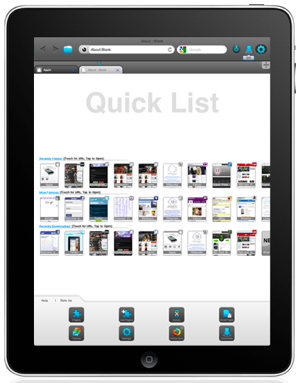
Another feature that, in particular, I appreciated was the “Quick Access List.” It acts like the quick-dial feature on your phone, but this one gives you quick access to your favorite websites. While this feature isn’t exactly new in the Web browser world (Safari also has bookmarks), it was something that I used frequently — maybe because it was so easily accessible — and it alone saved me plenty of time.

But for all of the individual pieces that make up the 360 Web Browser, the whole package makes up a single experience that can be summed up as follows: power.

Power trumps simplicity?

When you combine the hundreds of features that 360 Web Browser offers over the Safari browser on the iPhone and iPad, you are left with a truly powerful browser that puts Safari to shame. It foregoes any thought of minimalism and just gives the power users what they want: more power and control.
This will put off some users, make no mistake about it. When I first fired up 360 Web Browser, I had my reservations. But now that I have used it and seen how much more productive it has made me, I consider it a full replacement for Safari.
If control and functionality is what you are after, 360 Web Browser is a no brainer. It comes full circle with the feature set and makes Safari look like child’s play in the process. And while it lacks Adobe Flash (which might or might not be an issue), everything else on this browser is up to par with what Safari offers. You just might want to be aware that performance could be an issue.
But if you are satisfied with a minimalistic experience that focuses on speed and simplicity, 360 Web Browser might not be for you — the included Safari browser will probably be more than adequate for all your needs.
When all is said and done: you will either love it or hate it.

Conclusion

360 Web Browser is a compelling product that lives up to Digital Poke’s promise. It might be too much for some of the Apple fanatics that prefer their system maintain its clean and minimalistic setup, but for those who want to explore the mobile Web with the most feature-complete browser available today, 360 Web Browser is one of the best options available.
360 Web Browser comes in two flavors, 360 Web Browser Lite (free) and 360 Web Browser ($0.99) for iPhone and iPad.
This was a sponsored review for Digital Poke’s 360 Web Browser.

Thursday, March 24, 2011

Gallery: Internet Explorers 1 Through 9

By Alexis Madrigal
From: http://www.theatlantic.com/

Internet Explorer 1, 1995

Internet Explorer 1, 1995
Wikimedia
CLICK IMAGE ABOVE for Full Gallery:

Full Screen
Internet Explorer 1, 1995 Internet Explorer 2, 1995Internet Explorer 3, 1996Internet Explorer 4, 1997Internet Explorer 5, 1999Internet Explorer 6, 2001Internet Explorer 7, 2006Internet Explorer 8, 2009Internet Explorer, 2011


Note that the backgrounds of all web pages were this wonderful gray.

When Internet Explorer 1 came out in 1995, Mark Zuckerberg was 11 years old, and Microsoft dominated the software world. Earlier this week, just 16 years later, the company released Internet Explorer 9, its most ambitious design revamp in a long time. In-between, the web came of age, bubbled and burst. Google was birthed. Facebook, Twitter and social media exploded. Broadband became ubiquitous among the wealthier classes. A lot has changed on and around the web.

So, go back in time with us, and take a look at the evolution of Microsoft's Internet Explorer.


Click here for Full Gallery Slideshow: http://www.theatlantic.com/

Friday, April 16, 2010

Browser Speed Tests: iPhone's Mobile Safari vs. Opera Mini

From: http://lifehacker.com/

Browser Speed Tests: iPhone's Mobile Safari  vs. Opera MiniThis morning Apple surprised everyone by approving the Opera Mini web browser for the iPhone and iPod touch, bringing one of the most popular mobile browsers to the most popular smartphone. So how does it stack up?

First of all, it's worth pointing out that Opera Mini has one big roadblock for iPhone and iPod touch users: Apple doesn't allow you to set any other application as the default for web browsing, so if you're opening links from other applications, like Mail, you'll still launch Mobile Safari when you click that link. (To use Opera Mini, you'd have to copy the link, close Mail, open Opera Mini, and paste the link.) That's a pretty big hurdle, but it's not the end of the world, especially since more and more apps display links in-app unless you explicitly choose to open a link in Safari. All that aside, you probably still open Safari directly when you want to do a lot of basic web browsing, so nothing's standing in the way of just launching Opera Mini in those instances instead.

So let's talk speed and performance. I don't have all the same options for testing these as we have when we do our normal browser performance tests (most notably, memory use is missing, but since multitasking isn't on the iPhone yet anyway, that doesn't much matter), but we'll try to tackle as many of the same tests as we can. (Also like our other performance tests, these aren't exactly scientific, but we do follow our own set of guidelines to get as accurate of results as we can on limited equipment. For these tests, I'm using my iPhone 3G.)

Browser Boot Up/Load Time; Split Decision... Probably Mobile Safari

This is a little bit of a tricky category. What I found when pitting the two against each other in launch time is that, while the Mobile Safari took significantly longer to launch from a cold start—that is, after having rebooted my iPhone entirely—it apparently resides in the iPhone's system memory from that point forward, meaning subsequent launches are nearly instantaneous. Opera, on the other hand, had a better cold startup time, but it doesn't have the benefit of sitting in the system memory, so every launch for Opera Mini is a "cold" launch.

Browser Speed Tests: iPhone's Mobile Safari  vs. Opera Mini

Page Load Time; Winner: Opera Mini

To measure page load times, I timed five or so page loads on several popular sites over Wi-Fi, threw out the highest and lowest for each site, and then averaged them all out. In this category, Opera Mini absolutely pummeled Mobile Safari, especially on full versions of web sites like the New York Times front page (which partially rendered in Mobile Safari before it finished loading, but continued loading for over 40 seconds time and again).

Browser Speed Tests: iPhone's Mobile Safari  vs. Opera Mini

JavaScript, DOM, CSS Speed; Winner: Mobile Safari

We used Mozilla's very cool Dramaeo browser performance testing tool to pit Mobile Safari's JavaScript, DOM, and CSS chops against Opera Mini's. Unfortunately, we learned pretty quickly that, while Mobile Safari slowly chugged through the test (slowly compared to desktop browsers, that is), Opera Mini failed to run with any of them.

That's not necessarily a huge black mark against the speed of Opera Mini, per se, since we couldn't actually pit the two against each other, but it speaks pretty loudly about which browser is currently capable of offering a more desktop-like experience, and that's Mobile Safari.

Keep in mind that we're not saying that a more desktop-like experience is necessarily preferable; you're on a mobile device, after all, and that desktop performance does seem to come with some trade-offs—like the page load times mentioned above.

Takeaway

It's pretty clear that, while Opera Mini features seriously impressive page load times, it's still behind Mobile Safari on several levels—some of its disadvantages are due to Safari's advantaged position as the system default, some of them probably have more to do with the youth of Opera Mini on the iPhone platform. You will, however, notice the considerably faster page loads when you're using Opera Mini, and with the web, speed is everything. If Opera could keep the speed and fix some of the rough edges, it could be really impressive.

Speed aside, use Opera Mini for a while and you'll quickly miss the smooth zooming of Mobile Safari and the nice font rendering. (When you're looking at a desktop version of a site zoomed all the way out on Opera Mini, the type renders as big blocks of color and is generally unreadable.)

Browser Speed Tests: iPhone's Mobile Safari  vs. Opera Mini(Click the image above for a closer look.)

Still, I'm holding out hope for Opera Mini. The speedy page loads alone make it an ideal browser for a quick lookup, and its tabbed browsing interface is, in my opinion, superior to Mobile Safari's.

If you've been kicking the tires on Opera Mini since its release this morning, let's hear how its measuring up for you in the comments.


Send an email to Adam Pash, the author of this post, at tips+adam@lifehacker.com.

Tuesday, March 16, 2010

iPhone browsing could be faster with Opera -- if Apple approves

By Doug Gross, CNN

Opera clearly covets the iPhone's devoted and active user base.

CNN will have complete coverage of the 2010 South by Southwest Interactive Conference at www.cnn.com/TECH and @cnntech on Twitter.

Austin, Texas (CNN) -- The company behind the Web browser Opera is weeks away from submitting it to Apple's iPhone store for approval, a spokesman said Friday.

The result, according to the Norwegian company, would be a browser up to six times faster than the iPhone's default Web tool, Safari.

The question raised by the plans -- and the major publicity push Opera made last month at the Mobile World Conference in Barcelona, Spain -- is whether Apple will approve the application -- in effect creating competition for its own product.

At the South By Southwest Interactive festival in Austin, Opera spokesman Thomas Ford demonstrated for CNN the Opera Mini app being developed for the iPhone.

"I can't positively say the time frame, but I can say it's very soon," Ford said when asked when the app would be officially submitted to Apple. Asked whether it would be weeks or months, he said "weeks."

In the smartphone market, Opera currently is available on BlackBerry, Windows Mobile and Android platforms. Opera Mini is huge on non-smartphone mobile phones, accounting for much of its more than 50 million monthly users worldwide, according to the company.

But the company clearly covets the iPhone's devoted and active user base.

At the Barcelona conference, the company pushed Opera Mini hard -- an unusual approach for an application that hasn't yet been submitted, much less approved.

But Ford downplayed the notion that the push was meant to put pressure on Apple.

"This is a very, very complete beta," he said. "We were definitely ready to show it to people. We wanted people to see what it would do."

Apple did not respond to an e-mail seeking comment for this report.

While developers have sometimes complained that the Cupertino, California-based computer giant's standards for apps are sometimes hard to understand, Apple has been consistently clear on one point -- apps aren't accepted if they duplicate a function the iPhone already does.

Opera argues that Mini and Safari are different, saying Opera Mini is quicker at downloading regular Internet pages while Safari's design makes it more apt for more data-intensive functions, such as editing a Google document.

Opera's process involves running Web pages through their servers, stripping away all but the most essential data so the pages load quickly.

Whether that's enough of a distinction for Apple to allow another Web browser onto the iPhone remains to be seen.

"I wouldn't say we're trying to back Apple into a corner," Ford said. "We feel that we're very much following their rules."

Friday, May 29, 2009

The First Google Chrome Extensions: Block Ads, Check PageRank, and Use IE8 Accelerators

Written by Sarah Perez

During the Google I/O conference this week, one of the presentations from Day 1 was on the subject of Google Chrome's extension system. The long-awaited feature will finally deliver what Firefox and IE users have had for ages: a way to add more tools, services, and additional features to the browser.

If you're playing around with one of the developer builds of Google Chrome, you can test drive this feature before it makes its public debut. Already, there are a handful of extensions available including an ad-blocker called AdSweep, a PageRank checker, and Cleeki, an extension that ports IE8 Accelerators to Chrome.

About Extensions in Chrome

According to articles from both Google Operating System and CIO, here's what we know about how extensions work in Chrome, as described during that I/O presentation:

  1. Extensions use HTML, JavaScript, and CSS so they're easy for developers to write.
  2. You don't need to restart the browser after installing an extension (hurray!)
  3. Extensions will work in all future versions of the browser. Developers won't need to update their extensions with each new release. (No more abandoned extensions!)
  4. Extensions will run as separate processes: one per extension.
  5. Extensions can appear at the bottom of the browser. During the demo, an add-on that displayed new stories from Google Reader was shown in a bar at the bottom of the browser.
  6. Google will control the look of extension buttons to keep Chrome's UI uncluttered and consistent.
  7. Google will build an extension gallery where developers can submit extensions and users can find extensions to install.

Extensions Available Now

There are already some interesting extensions under development, which you can test out now in a developer build of Chrome.

AdSweep

AdSweep is an add-on that hides advertising on web page you visit similar to how AdBlock works. It uses JavaScript to adjust the CSS of a page and is also available as a user script.

Page Rank for Chrome

Page Rank for Chrome (shouldn't that be "PageRank?") is a simple extension that shows the Google PageRank for the current web site.

Cleeki

Perhaps the most fascinating of the three, however, is Cleeki, an extension that delivers the functionality of IE8's Accelerators to other browsers, a list that now includes Chrome. Accelerators are one of the newest (and best) features in the most recent version of Internet Explorer. Available from the right-click menu, they let you quickly perform actions that would have previously required opening a separate web page (e.g. "map this," "translate this," "find on Facebook," "define this," "email this," "Digg this," etc.)

With Cleeki installed (read how to here), you can do many of those same actions, although its appearance is somewhat different. IE8 accelerators are listed in a small right-click menu, but Cleeki actually opens up a secondary window like a pop-up where you can choose from the available actions and see the results.

The size of that window may turn off some users, so it's a shame that Google Chrome doesn't currently allow for a user preference system since Cleeki is actually very customizable (size, skin, behavior, etc.). According to the Cleeki blog, there's a hacking way to customize it, but they haven't shared that info yet...perhaps they will in the future.

Developers, Write Your Own Extensions

In the meantime, while we wait for this feature to hit the public build of Chrome, developers can get cracking writing their first Google Chrome extensions. For help getting started, they should check out these sample extensions and this tutorial which demonstrates how to write a simple extension.