
Zazzle Shop

Screen printing

Monday, December 8, 2008

50 Excellent Digital Photography Photoshop Tutorials

Adobe Photoshop is the industry standard for digital-image editing and graphics creation. Photoshop’s versatility makes it a popular choice among Web designers, graphic designers, digital media artists, print designers, photographers and other professionals in design and image-editing. Whether you’re designing a business card or website or digitally enhancing an image, you can rest assured that Photoshop will give you the necessary tools to get the job done.

In this article, we focus on tutorials on digital photography. You’ll find an assortment of top-notch tutorials that deal with applying post-production techniques and effects, color correction, enhancement and photo retouching. So fire up Photoshop and try out some of these wonderful tutorials on your own photos!

Without further ado, we present you with 50 Excellent Photoshop Tutorials for Digital Photography.

Photo Effects

HDR-Style Results Using Layers in Photoshop
Learn how to achieve HDR results in Photoshop using bracketed exposures during the production process and then Photoshop layers afterwards.

HDR Style Results Using Layers in Photoshop results.

How to Create Professional HDR Images
Here’s an excellent (and very popular) tutorial on creating high dynamic range (HDR) images; the author focuses on realism instead of going overboard with the application of HDR.

How to Create Professional HDR Images results.

Photoshop HDR tutorial
This tutorial shows you how to create true HDR using bracketed exposure and Photoshop for post-production.

Photoshop HDR tutorial results.

Using the HDR Feature in Photoshop CS2/CS3
This thorough tutorial walks you through the basic concept of HDR photography and how to use Photoshop to make your photographs pop.

Using the High Dynamic Range (HDR) Feature in Photoshop CS2/CS3 results

How to Make Digital Photos Look like Lomo Photography
In this tutorial, you’ll learn how to apply the “lomography” effect to your digital photos.

How To Make Digital Photos Look Like Lomo Photography results.

Infrared Photo Effect in Photoshop
This tutorial shows you a way to simulate the infrared effect with photos taken using point-and-shoot cameras.

Infrared Photo Effect In Photoshop results.

Exposure blending tutorial
Create an HDR photo by blending exposures with this Photoshop tutorial.

Exposure blending tutorial results.

Your photos, 300-style!
Give photographs the sepia-toned 300 movie effect.

Your photos, 300-style! results.

How to Use Photoshop’s Lens Blur Tool for Tilt-Shift Fakery
Tilt-shift lenses are expensive and not very versatile. Save some money by checking out this Photoshop tutorial on how to fake tilt-shift photography.

How to use Photoshop's Lens Blur tool for tilt-shift fakery results.

Tilt Shift Photoshop Tutorial: How to Make Fake Miniature Scenes
Here’s another method for faking tilt-shift photography.

Tilt Shift Photoshop Tutorial: How to Make Fake Miniature Scenes results.

The Tilt-Shift Miniature Fake Technique
This tutorial walks you through the basics of picking a subject for the tilt-shift effect and using Photoshop’s blur and gradient tools to fake it.

The Tilt-Shift Miniature Fake Technique results.

Vignette 2.0
Give your photos a natural-looking vignette effect by following along in this Photoshop tutorial.

Vignette 2.0 results.

Adding a Diffuse Glow to Your Images
Apply diffuse glow to your photographs to create a dreamy effect with this Photoshop tutorial.

Adding A Diffuse Glow To Your Images results.

Image Enhancement and Correction

Improving Landscape Photographs
Enhance your landscape images by reading through this Photoshop tutorial.

Improving Landscape Photographs results

Using Masks to Improve Landscape Images
Use the masking feature in Photoshop to improve your landscape images.

Using Masks To Improve Landscape Images results.

Color Correction, by the Numbers
Use CMYK values (obtained with the eyedropper tool in Photoshop) to correct colors in a photograph.

Color Correction, By the Numbers results.

Color Correction Using Levels and Eyedroppers
In this Photoshop tutorial, you’ll see another method of correcting colors by using the levels-adjustment feature and by sampling colors with the eyedropper tool.

Color correction using levels and eyedroppers results.

Enhance Your Image with Selective Color Adjustments
This tutorial uses a “non-destructive” and selective method for enhancing colors in a photograph.

Enhance Your Image with Selective Color Adjustments results.

Black and White Is the Key to Better Color
Temporarily convert your image to black and white to improve color enhancement methods in Photoshop.

Black & White Is the Key to Better Color results.

Understanding Local Contrast Enhancement
This excellent Photoshop tutorial explains local contrast enhancement and a method for using the unsharp mask feature.

Understanding Local Contrast Enhancement results.

Local Contrast Enhancement
Learn the theory behind local contrast enhancement and learn a practical way of applying the method to enhance images.

Local Contrast Enhancement results.

Sharpening Using an Unsharp Mask
Learn the concept behind the unsharp mask feature in Photoshop to sharpen photographs.

Sharpening Using an Unsharp Mask results.

Sharpen Those Photos: Unsharp Mask
This tutorial shares a brief history of traditional photo sharpening techniques and how to sharpen images digitally in Photoshop.

Sharpen those photos: Unsharp Mask results.

Noise Reduction by Image Averaging
Reduce image noise in Photoshop by following this in-depth tutorial.

Noise Reduction By Image Averaging results.

Using the Photoshop Levels Tool
This tutorial discusses the concept behind Photoshop’s levels tool, as well as how to use it effectively to enhance photographs.

Using the Photoshop Levels Tool results.

Using the Photoshop Curves Tool
In this Photoshop tutorial, you’ll learn about the curves tool in Photoshop and how to use it to improve photographs.

Using the Photoshop Curves Tool results.

Advanced Photo Sharpening
This Photoshop tutorial shares a more complex method for sharpening photos using a variety of techniques such as using filters and setting threshold adjustments.

Advanced Photo Sharpening results.

Controlled Image Sharpening
Learn another method of controlled image sharpening via this Photoshop tutorial.

Controlled Image Sharpening results.

Digital Blending
Learn how to enhance dynamic range by reading through this excellent Photoshop tutorial.

Digital Blending result.s

Gaussian Blur
Learn how to use Gaussian blur to enhance and soften photographs in Photoshop.

Gaussian Blur results.

Lens Correction Filter in Photoshop CS2
Learn about the lens correction filter in Photoshop to fix image distortions.

Lens Correction filter in Photoshop CS2 results.

Photo Manipulation and Retouching

Add Dynamic Lighting to a Flat Photograph
Add dynamic lighting to a photograph to make it pop in this Photoshop tutorial.

Add Dynamic Lighting to a Flat Photograph results.

Getting a Grip on the Vanishing Point Filter
Learn how to use Photoshop’s vanishing point filter to extend certain areas in the photograph.

Getting to Grips with the Vanishing Point Filter results.

How to Stitch Photos in Photoshop
Learn a method of stitching together two photographs using Photoshop.

How To Stitch Photos In Photoshop results.

Super-Fast and Easy Facial Retouching
In this tutorial, you’ll learn a method for hassle-free and speedy facial retouching.

Super Fast and Easy Facial Retouching results.

Quick and Effective Facial Photo Retouching
Here’s another method for quick and easy facial retouching.

Quick and Effective Facial Photo Retouching results.

Four Easy Photoshop Techniques to Make Your Pictures Pop!
This tutorial shares four simple but effective Photoshop techniques for isolating a subject.

4 Easy Photoshop Techniques to Make Your Pictures Pop! results.

Awesome Photo-Realistic Coloring Techniques
Learn the basics of coloring techniques via a practical example (coloring the hair of a black-and-white photograph) in this wonderful Photoshop tutorial.

Awesome Photorealistic Coloring Techniques results.

Removing Objects From Photos
Learn the basics of removing objects you don’t want to be seen in your photographs by following along in this Photoshop tutorial.

Removing Objects From Photos results.

Black and White with a Splash of Color
In this tutorial, you’ll see a method for the selective coloring of a black-and-white photo.

Black and White with a Splash of Colour results.

Hand-Colouring a Black-and-White Photo in Photoshop
Learn a method of manually coloring a black-and-white photo in Photoshop.

Hand Colouring A Black And White Photo In Photoshop results.

Converting a Digital Color Photo to Black and White
Here is another effective method of converting colored photographs to black and white.

Converting a Digital Color Photo into Black and White results.

Colour to Black and White Using Channel Mixer
Convert photos from color to black and white using Photoshop’s channel mixer.

Colour to BW using channel mixer results.

Quick Fix for Cluttered Backgrounds
Cluttered backgrounds can be a distraction from the photo’s subject. Here’s an introductory-level tutorial on reducing visual clutter in the background of a photograph.

Quick Fix for Cluttered Backgrounds results.

Antiquing Digital Images in Photoshop
You don’t have to wait decades for your photographs to fade in color; simulate the effect using Photoshop.

Antiquing Digital Images in Photoshop results.

Change Hair Color Photoshop Tutorial
Learn a method of retouching a subject’s hair color via this excellent Photoshop tutorial.

Change Hair Color Photoshop Tutorial results.

Creating a Sunset Effect in Photoshop Tutorial
Give photographs taken in the middle of the day a sunset effect by following along in this Photoshop tutorial.

Creating a sunset effect in Photoshop Tutorial results.

Photo Retouching: Spotlight Effect
In this Photoshop tutorial, you’ll learn how to highlight parts of a subject by giving the area a digitally placed, but natural-looking, spotlight.

Photo retouching: spotlight effect results.

Image Retouching: Advanced Skin Softening
Learn a method of removing skin blemishes by softening the skin using the surface blur filter in Photoshop.

Image Retouching: Advanced Skin Softening results.

Nesting Smart Objects for Multi-Mask Effects in Photoshop
Learn all about nesting smart objects in Photoshop to smoothen and sharpen details in a photo.

Nesting Smart Objects for Multimask Effects in Photoshop results.

About the Author

Jacob Gube is a Web developer/designer and author of Six Revisions, a blog on Web development and design. If you want to connect with the author, you can follow him on Twitter.

(al)
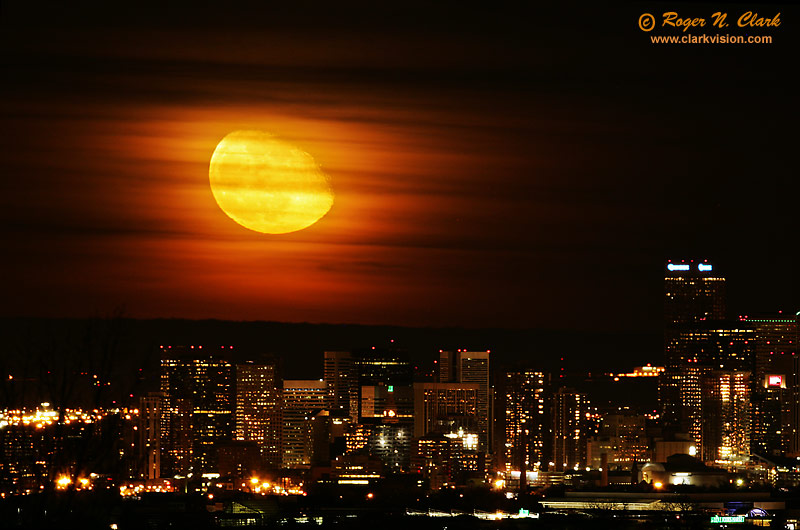
Moonrise over Denver, Colorado, USA

image moonrise.over.denver.11.16.2008.JZ3F9586.b-800.jpg is Copyrighted by Roger N. Clark, www.clarkvision.com
Image ID: moonrise.over.denver.11.16.2008.JZ3F9586.b-800.jpg
TITLE=Moonrise over Denver, November 16, 2008

The moon rises in partly cloudy skies over the city of Denver, photographed from Green Mountain. Yes, this is a real photo of the moon rising. It is not a composite. This image is from the in-camera jpeg. The red color is due to the thin clouds, much like a sunrise or sunset. The moon appears so large because it was taken with a telephoto lens, and the city was several miles away.

Technical: Canon 1D Mark II 8-megapixel camera, Canon 500 mm f/4 L IS lens at f/4.5 0.6 second at ISO 400, meter -1.7 stops, mirror lockup.

Keywords to this image = astrophoto-1 moon city Denver NEW

Obama may spell end of blank cheques for Israel

JERUSALEM (AFP) — Israel can no longer expect "blank cheques" from Washington once president-elect Barack Obama's administration takes over in January, a former US ambassador to the Jewish state said on Sunday.

"The era of the blank cheque is over," said Martin Indyk, director of the Centre for Middle East Policy at the Brookings Institute who is considered close to incoming secretary of state Hillary Clinton.

"The Obama administration intends to be engaged, using diplomacy to try to bring about a safer and more peaceful place, that is different from the seven years of the (George W.) Bush administration," he said on public radio.

"President Obama surely will want to work with Israel on this (Middle East) agenda. But there are obligations on both sides (Israel and the Arabs). Both sides will have to respect these obligations," Indyk said.

Acting Prime Minister Ehud Olmert held a "long conversation" with Clinton earlier this week and welcomed her nomination in Obama's team, his office said. She vowed to work for peace and stability in the Middle East.

Gas prices near 5-year low

Average gasoline price has dropped 22 cents in the last weeks.


(CNN) -- The U.S. average for gas prices dipped to $1.75 a gallon, a near five-year low, a national survey said Sunday.

The average price of self-serve gasoline dropped 22 cents in the past two weeks, said Trilby Lundberg, publisher of the Lundberg Survey.

The average, tallied on Friday, was the lowest since the $1.74 average on March 12, 2004, Lundberg said.

Lundberg attributed the price reductions to a drop in crude prices and demand. Prices could drop more if the global economic crisis continues to affect demand for crude oil.

The all-time high average was $4.11, set on July 11, according to Lundberg.

The Lundberg Survey is based on responses from more than 5,000 service stations nationwide.

Drivers in Cheyenne, Wyoming, had the cheapest gas prices, paying $1.46 on average. Motorists in Anchorage, Alaska, paid the most, at $2.54 on average.

Here are average prices in other cities:

Detroit, Michigan -- $1.61

El Paso, Texas -- $1.81

Atlanta, Georgia -- $1.72

Salt Lake City, Utah -- $1.58

Manchester, New Hampshire -- $1.76

Miami, Florida -- $1.87

Los Angeles, California -- $1.83

Portland, Oregon -- $1.93 To top of page

The Best Photon Detector Yet


Avalanche array: The circles shown in the above array are silicon photodetectors fabricated at Intel. The detectors were made different sizes so that the researchers could compare their performance.
Credit: Intel
Multimedia
video Watch Mario Paniccia, director of Intel's Photonics Technology Lab, describe the new detector.

Silicon is used throughout the electronics industry to make countless components and devices. This cheap and abundant chemical could also be about to transform the photonics industry, by making vital communication equipment cheaper and better. Engineers have already made a number of optical devices with silicon. On Sunday, researchers at Intel announced another significant advance: a silicon-based photodetector that achieves higher speed and sensitivity than other devices, including those made using exotic, expensive materials.

Light detectors are typically made of III-V semiconductors--materials composed of multiple elements such as indium and phosphorous. Although these semiconductors have great optical properties, they are more difficult to manufacture in high quantities than silicon, which makes them expensive. In the quest to make silicon photonics a reality and to match III-V semiconductor performance, researchers have sought to exploit the way electrons behave in silicon. And Intel's research, detailed yesterday in Nature Photonics, shows that silicon can make a detector that goes above and beyond expectations.

"This is the first time a silicon photonics device has [shown] better performance than any recorded for a III-V-based material," says Mario Paniccia, an Intel fellow and director of the company's photonics technology lab in Santa Clara, CA.

Detectors are crucial components in optical networks, receiving information transmitted via the light sent through fiber optic cable. Previously, Intel has built silicon-hybrid lasers, silicon-based modulators (which encode data on light), and detectors that use silicon as a channel to guide light.

Intel's new device is based on a pre-existing design: an avalanche photodetector. In this type of detector, light is received and amplified by electron behavior within the material used. Avalanche photodetectors are found inside bulky optical networking equipment and currently cost $200 to $300 dollars apiece. If these detectors could be made out of silicon, Paniccia says they could cost less than $10. This would translate into higher bandwidth at cheaper prices and make it feasible to add optical networking to computers themselves, replacing the slow copper wiring that connects circuit boards and microchips with superfast optical connectors.

A simple photodetector converts photons to electricity similar to a solar cell. Once inside the detector, a photon creates a quasi-particle made up of a negatively charged electron and positively charged "hole" (an electron vacancy). When voltage is applied to the detector, the electron and the hole separate, producing an electrical current. The characteristics of this current can reveal information encoded onto the light.


Wire it up: A packaged silicon avalanche photodetector (the gray square in the center of the image) is wired to several electrical contacts. The setup lets researchers test the device.
Credit: Intel

Avalanche photodetectors are based on similar principles. The difference is that a special region of the detector creates additional electron-hole pairs, so a single incoming photon can produce tens or hundreds of electrons, effectively amplifying the signal. Avalanche photodetectors use III-V materials for the amplification, but Intel's researchers turned to silicon instead. The new detector consists of an absorption region made of germanium and a "multiplication region" made of silicon. Previously it had been tricky to combine these two materials due to the spacing of each material's atoms. But a special method for laying germanium developed at Intel helped overcome this challenge. "The benefit of doing this in silicon is that it's a much better multiplication material because of its inherent properties of low noise and crystalline purity," says Paniccia.

The performance of a detector is measured by a characteristic called gain-bandwidth, which measures in gigahertz its potential speed and sensitivity. Traditional detectors operate with a gain-bandwidth of around 120 gigahertz, but Intel's detector reaches 340 gigahertz. What this means, explains Paniccia, is that it can produce a larger electrical response, for a given speed, than traditional detectors. Ultimately, this gives engineers the freedom to build network components that operate faster and more efficiently.

"We now have the opportunity to build high-speed optical links in networks and bring low-cost optical communication in and around our PCs," Paniccia says.

Intel's work is "a significant development," says Bahram Jalali, professor of electrical engineering at the University of California, Los Angeles. "Avalanche photodetectors provide the amplification needed to detect very weak optical data," he says. "Normally, the downside is that the avalanche process that leads to amplification also adds noise to the data," an undesirable characteristic that must be cleaned up using extra electronics. "However," he says, "silicon's material properties lead to very low avalanche noise."

Paniccia stresses that the new detector is not yet ready to appear in products. "We still have work to do in reducing dark current," he says, referring to stray current that leaks from the device even when it's not absorbing photons. But he says that he expects to see commercial silicon photodetectors from Intel in the next couple of years. For one thing, it should be possible to make the device with the equipment used to make other kinds of silicon electronics. "This was fabricated in our production fabs alongside other products," Paniccia says. "There's nothing fundamental there that we couldn't commercialize in the future."
